


Card Controls
Card Controls
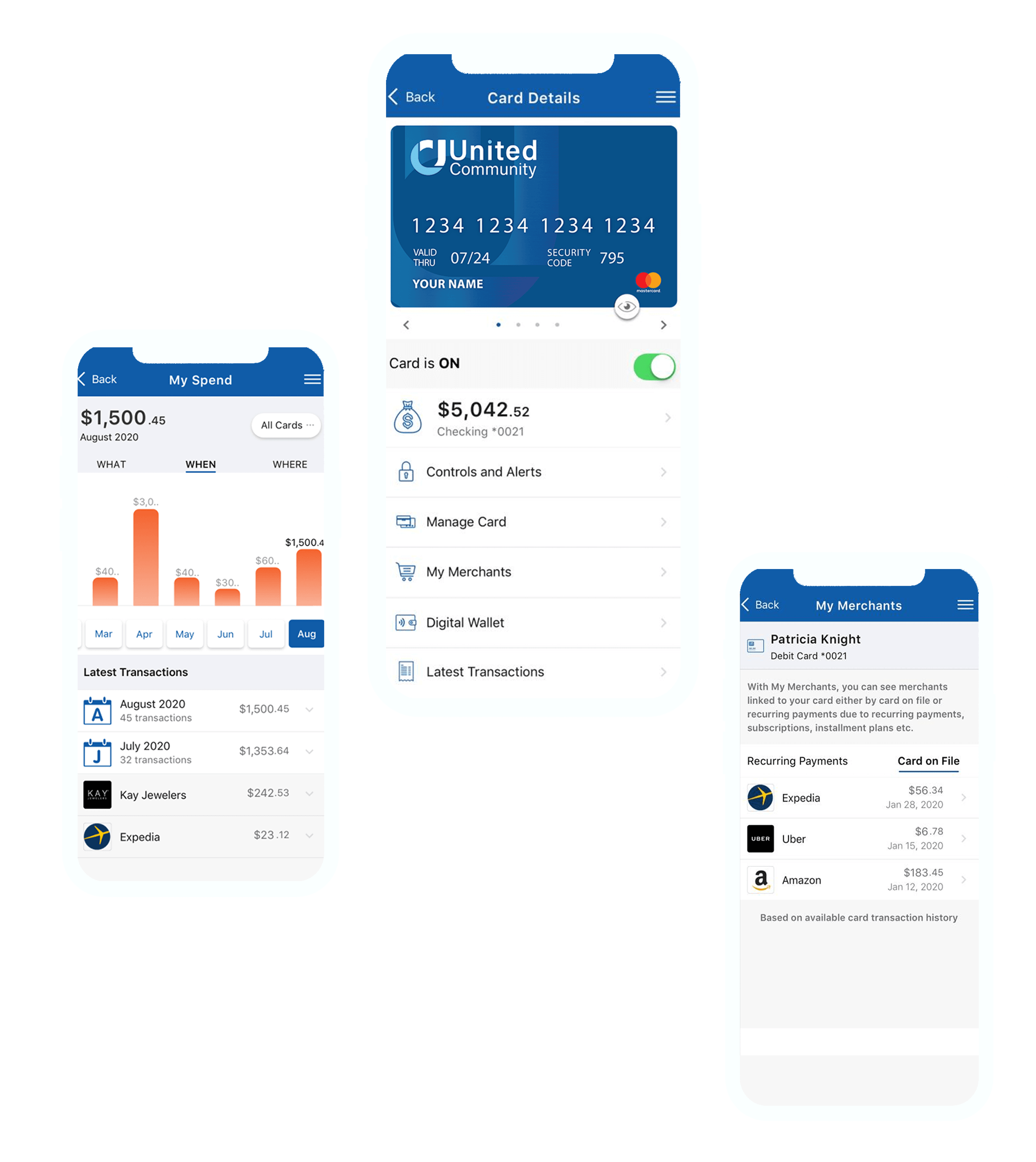
We’ve upgraded Card Controls with new features and brought it into our online and mobile banking experience—no need for a separate app! Protecting your debit card will be easier than ever with the new and improved Card Controls.
Card Controls Features
Digital Wallet
You can add your debit card to your digital wallet (Apple Pay, Google Pay) and pay with your smartphone at participating merchants.
Card on File
See which merchants you've chosen to store your debit card information for future transactions. (ex. ride-share companies, online shopping websites, etc.)
Recurring Payments
See all of your recurring payments and subscriptions, and make sure you're not paying for anything you're not using.
Spending Insights
Explore details about what, when, and where you're spending your money using your debit card.
Merchant Details
Transactions now have recognizable merchant details (name, contact, location, etc.) so you can more easily identify your transactions.
Fraud Push Notifications
You’ll get a notification through our mobile app for any suspicious transactions, and your card will be automatically restricted. Review the transactions to let us know if it was you (card will turn back on) or if it wasn’t (card will stay restricted for your safety).
Important Update Required
Please ensure you have the latest version of the United Community mobile app installed to begin using the upgraded Card Controls and avoid receiving an error message.
Search 'United Community Mobile' in the App Store or Google Play, or click the buttons below.
Learn How to Use Card Controls
Frequently Asked Questions
With Card Controls, you can:
- Manage cards on the go with advanced controls and self-service options.
- Understand your spending clearly with quick spending insights, recurring payment information, ‘card-on-file’ merchant identification, and transactions that easily let you see the merchant’s name, logo, interactive maps, and contact information.
- Get real-time transaction alerts so you know exactly when and where your card is being used.
- View a digital card on a mobile device and easily push it to Apple Pay® and Google Pay™.
Card Controls is integrated directly into United Online and Mobile Banking. Once you’ve logged in, select 'Card Controls' from the menu to access all the available features without having to use a separate app.
View this demo to get started!
No, you can remove and delete the app ‘Card Controls'. Card Controls is now fully integrated within United Community online banking and the mobile app.
Yes! Card Controls will work in a browser and the mobile app.
Yes, your profile, settings, and card preferences will automatically transfer to your United Online and Mobile Banking account and will still be in effect through the update.
They will have the same features. However, on the app, you will have the Apple/Google Pay push, and the options will be in a condensed view.
Yes. For each transaction, you’ll be able to see the date, time, location, and the merchant’s name and contact information.
Yes—you will need a token to view it, and the view will only last for 1 minute and 40 seconds.
No, Samsung Pay is not supported. Only Apple Pay® and Google Pay™ are supported.
Yes!
No, Card Controls can only be used with your United Community debit cards.
Yes, view this demo for step-by-step directions.
Yes! Within Card Controls, go to 'Manage Card' and then 'Set PIN'. You will need to receive a security token in order to reset your PIN. Follow the instructions in Card Controls.
Yes. However, it only turns the card off in Card Controls. To cancel the card or request a new one, you will still need to call us at 1-800-822-2651.
Yes. Card Controls is 24/7 access.