
FDIC-Insured - Backed by the full faith and credit of the U.S. Government

Frequently Asked Questions

business

Not at all! Our online banking is easy to use and our team will train you in your new payment method during your implementation phase. Our online banking is robust enough to handle complicated payment requests but still simple enough that a user with no technical experience can still make payments. If you are ever in need of help, our support team is standing by to walk you through any request.

Yes, there is a federal investment tax credit (ITC) of 26% of the cost of a solar photovoltaic (PV) system that can be claimed on federal income taxes. A client can also take advantage of accelerated depreciation (Modified Accelerated Cost-Recovery System, or MACRES) to reduce the overall cost of the system. Please see the Guide to the Federal Investment Tax Credit.

No! Whether your company has 1 employee or 10,000, our Treasury Management team has a solution to help streamline your cash flow and make banking more convenient. Each customer's services are tailored to your business needs and capabilities to ensure it's best for you.

Yes, all reports can be downloaded in a variety of formats to fit your business needs. Standard reports options include PDF and CSV files.

Yes, there is an Export function in the transaction list.

We offer export capabilities for Quicken, Quickbooks and Comma Separated Files. Select your account number from the Account Summary page. Select Filters. Choose Custom Date and enter the dates. Select Apply Filters and then, select Download above Apply Filters. Choose Quicken or QB.

This process is the same for Business Online Banking customers.

Attention Business customers: For other format capabilities review our Account Reconciliation service.

Yes, you can decision Positive Pay items on your mobile phone by downloading the United Community Mobile App and signing in to your online banking.

Yes, United does allow you to upload a NACHA compatible file for ACH Origination

Receiving payments and having that cash available in your account is a crucial step in the cash flow cycle. A receivables service such as Remote Deposit allows your business the opportunity to deposit payments any time of day and receive credit sooner.

United Community has several customizable reports available to all users in online banking with no charge. Some of our reporting is more complex and United does charge for these robust services. Your Treasury Management consultant will review any fees with you and find the reporting solution that is right for your business.

Our support team is standing by to help, Monday to Friday from 8:00am ET - 6:00pm ET. Contact them now at 1-866-270-6100 or send us an email at [email protected].

Personal Online Banking customers can cancel payments from within Bill Pay on the Pending Payment list and selecting the Cancel button beside the payment you would like to cancel. This will remove the transaction. If you would like to add the payment back to the system, you will need to reenter the transaction.

Treasury Management and Business Online Banking customers can contact Customer Support to assist in cancelling recurring payments or transfers. Call us toll-free at 1-866-270-6100, Monday–Friday, 8:30am–5:00pm, or email us at [email protected].

For email inquiries: In order for us to assist you, Always Include your bank location, the name on the account, your security answer and a preferred form of contact. If you would like a customer service representative to call you, please include your phone number and the best time to reach you. For your security, Never Include your identification numbers (social security numbers, etc.) or account numbers.

  • Business conversion, enlargement, repair, modernization or development
  • The purchase and development of land, buildings and associated infrastructure for commercial or industrial properties
  • The purchase and installation of machinery and equipment, supplies or inventory
  • Debt refinancing when such refinancing improves cash fow and creates jobs
  • Business and industrial acquisitions when the loan will maintain business operations and create or save jobs
Contact one of our specialized SBA Lenders on this page or call 1-888-987-5884.
 

Some opportunities have several solutions, your payroll may be one of them. It may be difficult to decide which solution is right for your business. Luckily, our team has the expertise to make that decision easier. We'll get to know your business and make recommendations that fit your business needs.

To qualify for a SBA loan, some basic requirements are:
  • Operate for profit
  • Be a U.S. Citizen or permanent legal resident
  • Show profitable projections for start-up or expansion of a business
  • Demonstrate reasonable equity to invest
For additional information, go to: Am I eligible?
 

We have a wide variety of Treasury Management products and services to meet the needs from small business to large commercial businesses. Our Treasury Solutions Consultants will tailor your services to fit your business's unique needs.

Our convenient wire transfer services allow you to move money to and from your United Community Bank account. This is a fast and secure payment method that, in most cases, clears on the same day the transfer is requested.

How to Receive a Domestic Wire Transfer

Provide the originating financial institution with the following wire information:
Wire funds to: United Community Bank
Routing number: 061112843
Address:
125 Highway 515 East
Blairsville, GA 30512
For Credit to: Your name and account number

Allow 24 hours for a domestic wire transfer to credit to an account. The domestic incoming wire fee is $14.

How to Send a Domestic Wire Transfer

Provide United Community Bank with the following wire information:
Wire funds to: The receiving financial institution’s name
Routing ABA number: Routing and transit number of receiving financial institution
Address: Address of receiving financial institution
For Credit to: Name, physical address, and account number of receiving party

Domestic outgoing wire fee sent via Business Online Banking is $12. Otherwise, the fee is $30.

How to Receive an International Wire Transfer

Provide the originating financial institution with the following wire information:
Wire funds to:
United Community Bank
125 Highway 515 East
Blairsville, GA 30512
SWIFT BIC: UCOUUS33
For Final Credit To: Your name and account number
Allow Up to 7 days for an international wire transfer to credit to an account.

International Incoming Wire Fee is $14. Currency conversion exchange rates may apply.

How to Send an International Wire Transfer

Provide United Community Bank with the following wire information:
Wire funds to: The receiving financial institution’s name
Swift Code: The Swift code (sometimes called BIC code) for the foreign financial institution
For Credit to: Name, physical address, and account number of receiving party

For wires being converted to a foreign currency, some additional information may be required to remit funds. Please contact your local branch for additional information.

The international outgoing wire fee is $50.

Our convenient wire transfer services allow you to move money to and from your United Community Bank account. This is a fast and secure payment method that, in most cases, clears on the same day the transfer is requested.

How to Receive a Domestic Wire Transfer

Provide the originating financial institution with the following wire information:
Wire funds to: United Community Bank
Routing number: 061112843
Address:
125 Highway 515 East
Blairsville, GA 30512
For Credit to: Your name and account number

Allow 24 hours for a domestic wire transfer to credit to an account. The domestic incoming wire fee is $14.

How to Send a Domestic Wire Transfer

Provide United Community Bank with the following wire information:
Wire funds to: The receiving financial institution’s name
Routing ABA number: Routing and transit number of receiving financial institution
Address: Address of receiving financial institution
For Credit to: Name, physical address, and account number of receiving party

Domestic outgoing wire fee sent via Business Online Banking is $12. Otherwise, the fee is $30.

How to Receive an International Wire Transfer

Provide the originating financial institution with the following wire information:
Wire funds to:
United Community Bank
125 Highway 515 East
Blairsville, GA 30512
SWIFT BIC: UCOUUS33
For Final Credit To: Your name and account number
Allow Up to 7 days for an international wire transfer to credit to an account.

International Incoming Wire Fee is $14. Currency conversion exchange rates may apply.

How to Send an International Wire Transfer

Provide United Community Bank with the following wire information:
Wire funds to: The receiving financial institution’s name
Swift Code: The Swift code (sometimes called BIC code) for the foreign financial institution
For Credit to: Name, physical address, and account number of receiving party

For wires being converted to a foreign currency, some additional information may be required to remit funds. Please contact your local branch for additional information.

The international outgoing wire fee is $50.

There are four easy steps to to transferring your account to United Community
  1. Open a new account online or in a branch
  2. Enroll in Business Online Banking to manage your accounts virtually
  3. Move your payments including recurring debits, payroll funding or any other repeating transactions
  4. Close your old account once activity has cleared and destroy any checks or cards
For more information visit your local branch and speak to a banker today

United's cutoff time for Same Day ACH transactions is 2:00 pm ET*

*Additional fees apply. Contact your Treasury Management team for more information.
The entire SBA loan process generally takes 60 to 90 days due to the high volume of paperwork and documentation that you need to provide.
With proper upkeep and maintenance, a system can last 25+ years.    

All of our services are tailored to fit your business needs. Even if you are your only employee, our Direct Deposit service can make your payroll process easier.

There are many variables that can determine individual savings including, but not limited to, utility, roof space, demand charges, net metering, but in the southeast we see clients saving anywhere between 30-60%.      
The advantages of obtaining a SBA loan from a SBA Preferred Lender include faster loan processing times and improved chances of approval.  Preferred Lenders have a proven track record of getting small business owners the funds they need in a timely manner.
  • Individual borrowers must be citizens of the United States or reside in the U.S. after being legally admitted for permanent residence
  • Private-entity borrowers must demonstrate that loan funds will remain in the U.S. and the facility being financed will primarily create new or save existing jobs for rural U.S. residents
An equity injection is an investment of funds borrowers contribute into their business before being granted a government guaranteed loan. It essentially functions as a down payment and is typically 10% for a SBA loan. Types of equity injection include:
  1. Cash and personal assets
  2. Investments or gifts
  3. Business assets
  4. Seller or third-party debt on full standby
  5. Combining two types of Seller debt for equity
Through the SBA 7(a) and 504 loan programs, small businesses can obtain a loan for a variety of needs including:
  1. Ground-up construction;
  2. Purchase of real estate and/or leasehold improvements;
  3. Purchase inventory, equipment, furniture and fixtures;
  4. Refinance debt
  5. Start-up a business
  6. Acquire another business
  7. Finance a franchise
  • Lines of credit
  • Owner-occupied and rental housing
  • Golf courses or golf course infrastructure
  • Racetracks or gambling facilities
  • Churches or church-controlled organizations
  • Fraternal organizations
  • Lending, investment and insurance companies
  • Agricultural production, with certain exceptions
  • Distribution or payment to a benefciary of the borrower or an individual or entity that will retain an ownership interest in the borrower
General documents required, but not limited to, for SBA loans are:
  1. 3-years Personal and Business Tax Returns in pdf format
  2. Formulated Business Plan
  3. Personal Financial Statement
  4. Driver’s License
  5. Bank Statements
  6. Business License and Entity Documentation
  7. Current Balance Sheet, Profit & Loss and Debt Schedules
PLP (Preferred Lender Program) status is the most desirable accreditation a lender can receive.  United Community is a SBA Preferred Lender which means we can offer the full range of SBA loan products, and have the authority to make final credit decisions on behalf of the SBA.  In contrast, non-preferred lenders must submit a full application to the SBA for approval, which makes the process longer.

United's Positive Pay service will match the account number from the check and compare the check serial number, check amount, date of the check, and the Payee name (if enrolled) for all checks presented against the account.

The U.S. Small Business Administration (SBA) is a federal agency that assists in financing new business and helps existing businesses grow and flourish.  An SBA loan is a small business loan provided by a financial institution and guaranteed by the SBA.  The SBA guarantee gives the financial institution more incentive to loan money to small businesses that might not normally qualify for a traditional commercial loan.
 
  • Rural areas not in a city or town with a population of more than 50,000 inhabitants
  • The borrower’s headquarters may be based within a larger city as long as the project is located in an eligible rural area
  • The lender may be located anywhere in the United States
When you originate ACH, you are directed to select a three-character code that identifies the recipient of the transaction. Please be sure you’re selecting the correct SEC code:
  • Select PPD if the recipient is a person or consumer and written authorization is obtained.
  • Select CCD if the recipient is a company or organization and written authorization is obtained.
In addition to our standard online banking security, ACH and Wire payments require a second form of authentication, referred to as a Token, before being sent. You can also require a secondary approval for your payment method to ensure one employee cannot send a payment on their own.
  • For-profit or non-profit businesses
  • Cooperatives
  • Federally-recognized tribes
  • Public bodies
  • Individuals engaged or proposing to engage in a business

Your account structure will depend on your business. Our Treasury Management consultants have years of expertise and industry knowledge to make sure your money works for you.

  • For-profit or non-profit businesses
  • Cooperatives
  • Federally-recognized tribes
  • Public bodies
  • Individuals engaged or proposing to engage in a business

An ACH transfer goes through an interbank system for verification called the Automated Clearing House (ACH) Network. This makes it a great option for easy to use, secure payments. A wire transfer goes directly to a receiving bank without the intermediary system. This will typically save processing time for a transaction and show up immediately.

Exceptions are available starting at 8:30am ET and can be decisioned in online banking until 1:30pm ET.

Please call us at 844-496-1313 for assistance with your account.    
For Treasury Management Banking Support:
Call us toll-free at 1-866-270-6100
Monday–Friday 8:30am–5:00pm
Or email us at [email protected]
United’s Renewable Energy Finance team has a combined 25+ years in the Renewable Energy industry as well as the expertise required to accurately model the economic and environmental impacts of installing a system at your facility. We also have a vast network of developers & installers who can make your PV System a reality, but don’t worry, we will be with you each step of the way!    
Reputable installers work with roofing manufacturers to not void any existing warranties.    

default

Yes! To ensure your loan payments are made on time every month, you can set up recurring payments. This option is available for registered users and is not available as a guest.

Another easy way to set up automated payments is to open a United checking or savings account online and set up scheduled online transfers free of charge.

Make a Loan Payment

Small businesses that were in operation prior to Feb 15, 2020, with 500 or less contract or salaried employees, are eligible to apply for this loan. Businesses must have paid salaries and payroll taxes and/or independent contractors as reported on Form 1099-MISC.

According to the U.S. Chamber of Commerce, the following entities are eligible:

  • A small business with fewer than 500 employees
  • A small business that otherwise meets the SBA’s size standard
  • A 501(c)(3) with fewer than 500 employees
  • An individual who operates as a sole proprietor
  • An individual who operates as an independent contractor
  • An individual who is self-employed who regularly carries on any trade or business
  • A Tribal business concern that meets the SBA size standard
  • A 501(c)(19) Veterans Organization that meets the SBA size standard

In addition, some special rules may make you eligible:

  • If you are in the accommodation and food services sector (NAICS 72), the 500-employee rule is applied on a per physical location basis
  • If you are operating as a franchise or receive financial assistance from an approved Small Business Investment Company the normal affiliation rules do not apply

REMEMBER: The 500-employee threshold includes all employees:
Full-time, part-time, and any other status. Businesses in certain industries can have more than 500 employees if they meet applicable SBA employee-based size standards for those industries (click here for additional detail).

For this program, the SBA’s affiliation standards are waived for small businesses (1) in the hotel and food services industries (click here for NAICS code 72 to confirm); or (2) that are franchises in the SBA’s Franchise Directory (click here to check); or (3) that receive financial assistance from small business investment companies licensed by the SBA. Additional guidance may be released as appropriate.

You have until June 30, 2020 to restore your full-time employment and salary levels for any changes made between February 15, 2020 and April 26, 2020.

Yes, the CARES Act provides financial assistance to both small businesses employing under 500 employees and 501(c)(3) organizations, including churches.

Any business may sign up for Business Online Banking. We have options that will meet your needs no matter what size your company may be. For more information on Business Online Banking, please contact our Support area at 866-270-6100 or visit our Business Online Banking page.
No. Interactive Teller Machines can do many more types of transactions than ATMs. United still has ATMs available to do transactions, like withdrawing cash, or making a deposit. United Community ITMs are ideal for transactions that require a personal teller.    

Use Minute Lender to quickly access cash. Existing checking customers with an email address can apply online in minutes for a loan or line of credit up to $15,000. You can apply online now and get our response in minutes; there's no need to visit the bank or bring us any paperwork. If approved, we'll email you when your loan is ready, usually in 3 business days or less. We invite you to contact us to discuss additional borrowing options that may meet your needs.

Yes. United Community maintains rigorous security standards and we have measures set up to review and stop the deposit (at the mobile device) if we detect specific concerns related to fraud or potential threat to your account security.    

*United Community reserves the right to restrict mobile deposit access for new online banking customers.

Our COVID-19 Updates page will be updated regularly to reflect our operating status across all of our locations. During this time of economic uncertainty, you may have questions and want to talk with your banker for financial guidance. We are here to help.


We remain committed to following the CDC guidance for protecting the health of our customers and employees. If you experience fever, cough, shortness of breath or have been in contact with someone who has, we ask that you avoid contact with employees and customers in our branches. Our drive-thrus are available for banking options at a safe social distance.

Personal Online Banking customers can transfer available funds from a personal line of credit or home equity line of credit. Select Transfer/Deposit, then click Funds Transfer and then choose the accounts.

Business customers should speak with your local lender to have this option added to Business Online Banking.

Yes, you may submit applications for both loan programs. However it is important to understand the differences between how the proceeds of the loans may be used.

The first card you add to your Wallet automatically becomes your default card. This is the card that will automatically appear when you use Apple Pay™. To change your default card, simply open settings and select Wallet & Apple Pay™ and choose a new card.

Yes. You can pay your bills as well as view and modify pending payments from United Community Mobile Banking, including the Mobile Banking App and Mobile web-based Banking.

Note: This service is not available with text banking.

Yes. There are no prepayment penalties or fees.

Yes! But here’s a few things to remember:

  1. The loan can’t be a revolving line of credit as we do not process and payoff this loan type through the online loan payment system. Revolving lines of credit include Overdraft Protection, Home Equity Line of Credit, Personal Line of Credit or Business Line of Credit.
  2. The payment must be $5,000 or less and result in all outstanding principal, interest and applicable fees paid to $0.

Make a Loan Payment

Yes, Tap on Pay Bills/People on the left menu, then Tap Add Payee at the top to add a payee.

Important: Keep in mind this is the mobile version of Bill Pay. It is not the full version of Bill Pay that is available from a desktop. The mobile version of Bill Pay will allow you to add/edit single payments, but you cannot edit recurring payments or E-bills. Please login to your online banking from a tablet or computer to access the full Bill Pay.

Yes, you can pay within apps when you see the Buy with Apply Pay™ button or Apple Pay™ as a payment option. To pay, tap the Buy with Apply Pay™ or Apple Pay™ button. Verify your billing, shipping, and contact information. Place your finger on Touch ID™ and once complete, you will see “Done” and a checkmark on the screen.
Yes, you can use Card Controls in online banking with your tablet. View the Digital Demo to get started with Card Controls.
Yes and no. Because you need to source where the down payment comes from, you’ll need to use money that’s in a checking or savings account with your name on it instead of actual cash in hand. You can either bring a cashier’s check to closing or have the money wired from the bank to the attorney. The final answer depends on the attorney, so make sure to ask them what exactly you should do.
They do. You’ll be able to see transactions in real time in your available balance on Digital Banking and Mobile Banking. Transactions may not appear in your history until the next business day.
 
You don’t. There are two other options: a home equity loan (HELoan) and a home equity line of credit (HELOC).

A HELoan is a second mortgage that usually has a fixed interest rate and monthly payments of the same amount every month. A HELOC works more like a credit card, but the interest rate is typically lower than a credit card.

You have a maximum amount you can borrow as needed. HELOCs usually have a variable interest rate and monthly payments that may go up or down.

Take a closer look at the differences: Should You Consider a HELOC or HELoan?
No, but you do have to have a mobile cellular device. United Community also offers Text Banking. From any mobile phone with texting capabilities you can instantly view balances, recent transactions and receive text alerts.    

No, the transition is happening worldwide. All financial institutions with loans referencing LIBOR will be impacted.

Yes. You can store your card securely in Click to Pay. Then just look for the Click to Pay icon when you check out online using your desktop computer, laptop, tablet, or smartphone.

Watch a quick tutorial.

This loan program was by the Federal Government in the wake of the COVID-19 global health crisis. Under this program, you can apply for loan forgiveness after receiving the funds. A unique feature of this program is that you won’t have to pay on your loan for the first 6 months.

Access United Community’s 24-Hour Telephone Banking by dialing 1-800-UCBANK1. You will be able to check your account balance, review your transactions, transfer funds, make a payment, report lost or stolen cards, and much more.    
In a card cracking scam, a fraudster tempts people to provide their debit card PIN number by promising an opportunity to make easy money. The scam usually starts with a direct message on social media. Don’t respond to these messages and never give your PIN number to anyone. Report the suspected scam to the social media site to help others stay safe, too.

Check out these articles for more fraud prevention tips:

Online Banking customers can delete recurring transfers as long as the transaction is initiated online. To do so, click Transactions on the left menu. Then, click Activity Center, click Recurring Transaction, click the Action button to the right of the transfer and click Cancel Series. Confirm.

This is the same process for business customers. Treasury Management and Business Online Banking customers can contact Customer Support to assist in cancelling recurring payments or transfers. Call us toll-free at 1-866-270-6100, Monday-Friday, 8:30am-5:00pm, or email us at [email protected] for assistance.

For email inquiries: In order for us to assist you, Always Include your bank location, the name on the account, your security answer and a preferred form of contact. If you would like a customer service representative to call you, please include your phone number and the best time to reach you. For your security, Never Include your identification numbers (social security numbers, etc.) or account numbers.

Checking your balance has never been easier with United Community's online banking. Click here to enroll.
Need help with the enrollment process? View a step-by-step demo here

Download United Community's mobile app and check your balance anytime, anywhere, at your convenience.
View step-by-step demos to get started here.
From the Home screen, click Apps, Samsung Pay, More, Settings, Edit Simple Pay. Once you get to Edit Simple Pay, unmark checkbox to remove a card from displaying Simple Pay.    

For general questions about United products or services, call 1-800-UCBANK1 (1-800-822-2651) during these hours:

  • Monday–Friday: 8:00am–6:00pm ET
  • Saturday: 9:00am–12:00pm ET

For online banking support, call 1-800-822-2651 during these hours:

  • Monday–Friday: 8:00am–6:00pm
  • Saturday: 9:00am–12:00pm

You can also log in to your account to chat or send a secure email.

See more ways to contact us

Grow your future with our expertise and the convenience of online investment management. Get started today.
Do your best to pay your bills on time and keep your credit card balances as low as you can. As you pay off credit cards, keep them open to show your good payment track record. If you’re in trouble with credit card debt, consider talking to a credit counselor.

Get seven more tips for improving your credit score.
If you’d like to request an increase to your debit card limits, we’d be happy to assist you. You can reach out to your local branch office for support, log in to online banking and securely chat with us, or call our Customer Contact Center at 1-800-UCBANK1 (1-800-822-2651) between the following hours:
  • Monday–Friday, 8:00am–6:00pm ET
  • Saturday, 9:00am–12:00pm ET
If you’d like to request an increase to your mobile deposit limits, our customer support representatives would be happy to assist you. You can securely chat with us within online banking, or you can reach us toll-free at 1-800-UCBANK1 (1-800-822-2651) between the following hours:
  • Monday–Friday, 8:00am–6:00pm ET
  • Saturday, 9:00am–12:00pm ET

*United Community reserves the right to restrict mobile deposit access for new online banking customers.

The cost of checks depends on which type you need. Our team will be happy to assist you with ordering; you can reach us toll-free at 1-800-UCBANK1 (1-800-822-2651) between the following hours:
  • Monday–Friday, 8:00am–6:00pm ET
  • Saturday, 9:00am–12:00pm ET
If you’re placing a re-order, you can order checks through your online banking account under ‘Additional Services’.
 
You can make extra mortgage payments or extra payments on mortgage principal to pay off your mortgage faster. Consider putting financial windfalls like tax refunds toward your mortgage. Other ways include refinancing at a lower interest rate or for a shorter term.

To get more ideas, read this article: 4 Strategies to Pay Off Your Mortgage Faster.
Taking the stress out of managing your debit card is within your reach. By enrolling in Card Controls within United's online and mobile banking, you can safely and conveniently control purchases, spending limits and monitor activity. Want to get started? View these step-by-step demos to get started with Card Controls.
Mortgage lenders like United take several factors into consideration, including your credit score, debt-to-income ratio, employment history, and assets. You can get a free copy of your credit report every 12 months from each of the three nationwide credit bureaus—Equifax, Experian, and TransUnion—by visiting www.annualcreditreport.com.

You can submit a request to United Community Bank. The request will include documents that verify the number of full-time equivalent employees and pay rates, as well as the payments on eligible mortgage, lease, and utility obligations. You must certify that the documents are true and that you used the forgiveness amount to keep employees and make eligible mortgage interest, rent, and utility payments. United Community Bank must make a decision on the forgiveness within 60 days.

From the left menu bar:
  • Click or tap the Account Summary tab, all of your accounts will be listed in boxes to the right
  • Click or tap the account box you would like to see the transactions for and all activity should populate.
  • Click or tap the specific transaction you would like to see and if the item is a check the image will populate below the transaction. Transaction details will also display.
  • From the left menu bar,
  • Click or tap the Account Summary tab, all of your accounts will be listed in boxes to the right
  • Click or tap the account box you would like to see the transactions for and all activity should populate.
  • Click or tap the specific transaction you would like to see and if the item is a check the image will populate below the transaction. Transaction details will also display.
To view current transactions:
  1. Within your online banking account, click ‘Account Summary.’ All of your accounts will be listed in boxes to the right.
  2. Click on the account box you would like to see the transactions for, and all activity should populate.
  3. Click on the specific transaction you’d like to see. If the item is a check, the image will populate below the transaction.
To view current check numbers:
  1. On the left toolbar within online banking, click ‘Account Summary.’
  2. Click on the account box you would like to see the transactions for, and all activity should populate.
  3. Click on the filters button above the transactions.
  4. Select the drop-down box in the ‘Time Period’ option.
  5. Enter the transaction type.
  6. Enter a single check or a range of check numbers.
  7. Click ‘Apply Filters’ to view the check.
If you need further assistance, please contact our customer support representatives at 1-800-UCBANK1 (1-800-822-2651) between the following hours:
  • Monday–Friday, 8:00am–6:00pm ET
  • Saturday, 9:00am–12:00pm ET
You can set up a travel notice with Card Controls. View the demo here. If you do not have online banking or need further help, please call our customer support representatives at 1-800-UCBANK1 (1-800-822-2651) between the following hours:
  • Monday–Friday, 8:00am–6:00pm ET
  • Saturday, 9:00am–12:00pm ET
If you are worried about a pending written check, you can request a stop payment to prevent it from being cashed. View the step-by-step demo to learn how to stop a payment in United Community's online banking. 

Need to enroll in online banking? Visit our Online Banking Enrollment page to get started. 
For instructions on how to transfer funds between your accounts and to other United customers, click to view our Quick and Easy Guide to Online Banking and Bill Pay and go to pages 43–49. If you need further assistance, please call our customer support representatives at 1-800-UCBANK1 (1-800-822-2651) between the following hours:
  • Monday–Friday, 8:00am–6:00pm ET
  • Saturday, 9:00am–12:00pm ET
With United Community's online banking, you can save time and money by transfering funds at your convenience. 
  • Transfer funds from one of your accounts to another. View the demo here.
  • Transfer funds with Zelle to send and receive money with friends, family and other people you know and trust. (Zelle is available for retail customers only). View the demo here.
Waiting for paper statements to arrive by mail can be frustrating. By enrolling in eStatements, you can save time and view your statement at your convenience! View this step-by-step demo to learn how to enroll in eStatements.
You can view your account balances anytime through online and mobile banking. To see your balances in online banking, select the “Account Summary” tab from the left menu bar. All of your accounts and balances will be listed in boxes to the right. You can then select any account and see all transactions and activity.
Whether you’re looking for a loan to finance a car, home improvements, or anything else, a loan calculator can help you answer the question, “Can I afford this?”

An online lending calculator is a quick and easy way to get an idea of how a loan could fit into your budget. These calculators let you plug in different loan amounts, interest rates, and terms. In seconds, you can get a good idea of how much your monthly payments might be and how long it might take to pay off the loan.

Start calculating:

The CARES Act provides cash assistance directly to eligible taxpayers among other opportunities for relief.

One-time checks

The U.S. Treasury has stated it will issue refund checks “as rapidly as possible,” and officials are hoping for April. The full credit amount of $1,200 for individuals and $2,400 for couples is available for individuals with income at or below $75,000 ($112,500 for heads of household) and couples with income at or below $150,000. You will receive an additional $500 per child. Your tax rebate amount will be reduced by $5 for each $100 your income exceeds the income limits. That means for those without children, an individual will not receive a rebate if his or her income exceeds $99,000 or for couples, more than $198,000 of income.

401K and IRA early withdrawal penalties

10% early withdrawal penalties will be waived for certain coronavirus-related 401k and IRA distributions up to $100,000 made during 2020.

Student loans

Federal student loan payments will be waived for up to six months, and interest will not be accrued during this period.

Unemployment benefits

Individual unemployment benefits provided by states will increase by an additional $600 per week for four months, retroactive to January 27.

Credit reporting

The Act creates a moratorium on missed payment reports to credit reporting agencies for the duration of the public health emergency and 120 days thereafter.

Mortgages

Foreclosures will be prohibited on all federally-backed mortgage loans for 60 days beginning March 18, 2020, and up to 360 days of forbearance (180 days, plus one 180-day renewal) will be provided for borrowers of a federally-backed mortgage loan who have experienced a financial hardship related to the COVID-19 emergency.

The goal of the CARES Act is to provide financial assistance to businesses and incentivize businesses to keep employees on payroll. These provisions are also referred to as the Paycheck Protection Program (PPP).

The Act focuses on the Small Business Administration (SBA) Section 7(a) guaranteed lending program. SBA will provide additional guidance and implementation dates following enactment of the Act.

  • The Act authorizes $349 billion for loans under the SBA Section 7(a) guaranteed lending program to cover eligible business concerns or non-profits with fewer than 500 employees. It waives all fees and increases the federal government guarantee to 100 percent, with payments deferred for up to 6 months and no prepayment penalty.
  • The Act increases the loan amounts available under 7(a) to the lesser of $10 million or 2.5 times average monthly payroll, plus the value of any existing EIDL loan received after January 31, 2020, and provides eligibility for loan forgiveness on all amounts used for payroll, mortgage interest, lease, and utility payments between February 15, 2020, and June 30, 2020. Loan forgiveness will be reduced if there is a reduction in the number of employees or employee compensation during this period. Loans are capped at 4 percent and terms of up to 10 years.
  • Loans may also be used — but not forgiven — for other specified purposes.

Assistance for mid-size businesses is being accounted for in provisions related to the severely distressed sectors of the economy:

  • As part of a $454 billion provision in support of Federal Reserve lending, the Act directs the U.S. Treasury and Federal Reserve to try to provide financing to banks and other lenders that make direct loans to eligible businesses and nonprofits with 500 to 10,000 employees.
  • The interest rate on loans would be capped at 2 percent, with no payments due for the first 6 months, and borrowers would be required to provide good-faith certification to a list of conditions, including workforce retention; no payment of dividends or stock buybacks; no outsourcing or offshoring of jobs; and union neutrality with no collective bargaining agreement breaches for two years after repayment.

According to the U.S. Chamber of Commerce, the calculated amount of loan forgiveness is reduced if there is a reduction in the number of employees or a reduction of greater than 25% in wages paid to employees.

When you borrow money to buy a car, you’ll pay it back monthly plus interest and fees. The lender will own the title until the loan is paid off. They can also repossess the car if auto loan payments aren’t made.

Check out this article to learn more: What to Know About Auto Loans.
 
To add your United Community Bank debit card(s), go to Wallet & Apple Pay™ (located in Settings) on your device. Simply follow the steps listed to add your new card. Once your card is verified, tap Next and start shopping.
Simply open the Google Pay app and add your card by following the on-screen instructions. If your card successfully loads and activates, no further steps are required.     

You can edit your account nicknames and show or hide account from Settings > Account Preferences. View the Digital Demo for step-by-step instructions.

Our customer support representatives are happy to assist you with adding or changing the accounts you access within online banking.

For Online & Mobile Banking Support:
Call us toll-free at 1-800-UCBANK1 (1-800-822-2651)
Monday–Friday 8:00am–6:00pm EST
Saturday 9:00am–12:00pm EST

For Treasury Management Banking Support:
Call us toll-free at 1-866-270-6100
Monday–Friday 8:30am-5:00pm
Or email us at [email protected]

For Email Inquiries:
In order for us to assist you, ALWAYS INCLUDE your bank location, the name on the account, your security answer and a preferred form of contact. If you would like a customer service representative to call you, please include your phone number and the best time to reach you. For your security, NEVER INCLUDE your identification numbers (social security numbers, etc.) or account numbers.

This loan will be packaged as an SBA 7(a) loan, and businesses can apply through qualified lenders including United Community Bank, a preferred lender for the SBA. SBA application fees will be waived. Due to the minimal program requirements, the approval and funding process will be streamlined, resulting in getting capital in the hands of businesses who need it most. If you are a current United Community Bank customer, please reach out to your banker. If you are not a United Community Bank customer, we encourage you to contact us to discuss options for your business.

To apply for Business Bill Pay, log in to Online Banking, select Bill Pay on the left menu and select the accounts you want to enroll. Once completed, the enrollment is immediate. Simply review and agree to the terms and conditions then complete the application. Please be aware, Business Online Banking requires any additional accounts to the customer's Bill Pay profile to be added manually in bill pay.    

Generally speaking, monthly payroll costs are calculated as follows:

Sum of INCLUDED payroll costs – sum of EXCLUDED payroll costs = PAYROLL COSTS

According to the U.S. Chamber of Commerce, there are specific items that

The following are INCLUDED in payroll costs:

  1. For Employers: The sum of payments of any compensation with respect to employees that is a:
    • salary, wage, commission, or similar compensation;
    • payment of cash tip or equivalent;
    • payment for vacation, parental, family, medical, or sick leave
    • allowance for dismissal or separation
    • payment required for the provisions of group health care benefits, including insurance premiums
    • payment of any retirement benefit
    • payment of state or local tax assessed on the compensation of the employee
  2. For Sole Proprietors, Independent Contractors, and Self-Employed Individuals: The sum of payments of any compensation to or income of a sole proprietor or independent contractor that is a wage, commission, income, net earnings from self-employment, or similar compensation and that is in an amount that is not more than $100,000 in one year, as pro-rated for the covered period.

The following are EXCLUDED in payroll costs:

  1. Compensation of an individual employee in excess of an annual salary of $100,000, as prorated for the period February 15, to June 30, 2020
  2. Payroll taxes, railroad retirement taxes, and income taxes
  3. Any compensation of an employee whose principal place of residence is outside of the United States
  4. Qualified sick leave wages for which a credit is allowed under section 7001 of the Families First Coronavirus Response Act (Public Law 116–5 127); or qualified family leave wages for which a credit is allowed under section 7003 of the Families First Coronavirus Response Act
Different POS systems come with different capabilities, costs, types of payments accepted, and levels of customer service.

Clover, Square, and PayPal are three popular options.

For a side-by-side comparison, read the article: What’s the Best POS System for Your Business?
 

Here's a guideline for creating a password that denies unauthorized computer access:

  • Use at least eight characters with a combination of uppercase and lowercase letters, numbers and symbols
  • Don't include your user name, real name or company name
  • Don't make your password a complete word
  • Create passwords that are significantly different from each other
Read our blog on best practices for a strong password. 
To enroll for Business Online Banking, select Enroll from the login box in the top right corner of ucbi.com.  Review the Terms and Agreements. Then, complete and submit the enrollment form. Once submitted, you will receive a phone call from our support team within 2 business days. If you need to contact us about your enrollment please call us toll-free at 1-866-270-6100.    
United Community Mobile App users do not need to enroll in Mobile Deposit. If you already have the United Community Mobile App (and the account is designated as eligible) the Mobile Deposit function will automatically be activated and  available the month following your enrollment and a deposit icon will automatically appear on the app screen. 

*United Community reserves the right to restrict mobile deposit access for new online banking customers.

View this step-by-step demo to learn how to enroll in online banking. 

View the Digital Demo here

In order to find out why a loan payment made from a debit card of another financial institution was declined, you will need to contact the financial institution who issued the card.    
All United checking accounts come with a United Mastercard® debit card. We offer four different types of checking accounts, including accounts specifically designed for students and people 55.+

Compare checking account options.
 
Secure Access Codes are delivered to you using secure contact information that we have on file for your accounts. When you log in to UCB online banking from a new device or browser, you can choose to have your Secure Access Code delivered via text or by phone depending on what contact information we have on file for you. 

View the Digital Demo to walk through the process.

Installing United Community's Mobile App on your mobile device is easy! Download it directly from the App Store for iPhone or Google® Play Store, go to Search and enter "United Community Mobile". Use your Personal Online Banking Access ID and Password to log into the app.

Need help downloading the mobile apps? View our Digital Demos to download the United Community mobile app for iPhone here and Android here.

View this Digital Demo to learn how to log in to the mobile app on your mobile device for the first time. 

After you apply for a loan, your mortgage loan originator will ask if you want to lock in your interest rate. It’s a lender’s guarantee that your interest rate won’t change for a certain period of time, even if market rates go up. The lock is a holding period designed to last throughout the mortgage process and closing day.

Once enrolled, you can easily access Mobile Banking by:

App - Download the United Community Bank Mobile App for iPhone® or Android™, open the App and log in using your Online Banking credentials.

Mobile Web-Based Banking – Using the Mobile Banking link obtained during enrollment, log in to Mobile Banking from your mobile web browser with your Online Banking credentials

Text Banking – By sending text commands such as BAL, HIST or HELP to 226563. View the Digital Demo for assistance enrolling in Text Banking.

Our Customer Support team is happy to assist you in getting any additional accounts added to Bill Pay.

For Online & Mobile Banking Support:
Call us toll-free at 1-800-UCBANK1 (1-800-822-2651)
Monday–Friday 8:00am–6:00pm EST
Saturday 9:00am–12:00pm EST

For Treasury Management Banking Support:
Call us toll-free at 1-866-270-6100
Monday–Friday 8:30am-5:00pm
Or email us at [email protected]

For Email Inquiries:
In order for us to assist you, Always Include your bank location, the name on the account, your security answer and a preferred form of contact. If you would like a customer service representative to call you, please include your phone number and the best time to reach you. For your security, Never Include your identification numbers (social security numbers, etc.) or account numbers

Preparing to deposit a check using the Mobile Banking App is easy! Simply endorse the check in the specified area on the back of the check. The endorsement should be signed exactly as made out on the front. (For example, a check made out to ‘Johnny Smith’ should not be endorsed ‘John Smith.’) View the Digital Demo here.

Helpful tips:

  • After taking a photo of the front and back of the check and verifying that it has been reviewed and accepted, you may want to date and write ‘Mobile Deposit’ on the front of the check to help you remember that the check has already been deposited.
  • We suggest that you keep the check for 45 days at which point you can then safely destroy or shred it.
To remove a card from Android, select Google Pay. Next, touch the card you want to remove and select 'More.' Then, simply touch 'Delete Card.' You will need to confirm by selecting 'Delete.' Confirm the card deletion again with your fingerprint or by touching PIN and entering the four-digit code.    
To remove a card from Android, select Samsung Pay. Next, touch the card you want to remove and select More. Then, simply click Delete Card. You will need to confirm by selecting Delete. Confirm the card deletion again with your fingerprint or by touching PIN and entering the four-digit code.    
View the Stop Payment Digital Demo for step-by-step instructions.

Please note: It is the customer's responsibility to ensure the check has not previously cleared. Stop payment fees will apply. The Stop Payment fee will appear in the request box along with the number of days before the Stop Payment expires. The Stop Payment will expire 6 months from the date the Stop Payment is placed.

Log in to Online Banking. Click Settings on the left menu, click Address Change, edit the Email address and submit.

For Online & Mobile Banking Support:
Call us toll-free at 1-800-UCBANK1 (1-800-822-2651)
Monday–Friday 8:00am–6:00pm EST
Saturday 9:00am–12:00pm EST

For Treasury Management/Business Online Banking Support:
Call us toll-free at 1-866-270-6100
Monday–Friday 8:30am-5:00pm
Or email us at [email protected]

For Email Inquiries:
In order for us to assist you, Always Include your bank location, the name on the account, your security answer and a preferred form of contact. If you would like a customer service representative to call you, please include your phone number and the best time to reach you. For your security, Never Include your identification numbers (social security numbers, etc.) or account numbers.

To use Apple Pay™, your iPhone 6, iPhone 6 Plus or newer model must be running the latest version of iOS software. To make purchases at a participating merchant, simply hold your device over the terminal and accept the charge with your fingerprint or passcode when prompted. If you need to provide the last four digits of your card number when making a purchase, instead provide the last four digits of the device account number.

Go to Settings on your device and select Wallet & Apple Pay™, tap your card, and then tap the      icon to see your Device Account Number. Some stores may ask for a signature or debit card PIN to complete your transaction.

Up to 100% of the principal amount of the loan may be forgiven if you use the proceeds on payroll costs, mortgage interest, rent, and utilities payments over the 8 weeks after getting the loan. The loan forgiveness program is designed to support employment– if you don’t maintain certain levels of employees or compensation, then part of the loan will not be forgiven. More details of the forgiveness program are still being determined and we will share more details and explain the process better once we have the guidance from the SBA.

Your first step is to talk to one of our mortgage experts (an MLO). After that conversation, we’ll determine the best loan products and interest rates available to you based on information you provide. Be prepared to share bank statements, W2s, paystubs, tax returns (in some cases), and a government issued ID. We use a secure, digital portal to collect and make it easy to share all of these documents.

The PATH loan also requires proof of your last 12 months of rental payments, so if you’re interested in this option, it’ll be helpful to have those on hand. You can use canceled checks used to pay rent, get a letter from your landlord, or provide bank statements showing a recurring debit from your bank account.

An independent government agency, the Federal Deposit and Insurance Corporation (FDIC) provides insurance to banks that protects their customers’ deposit accounts up to a certain amount if the bank fails. Look for the FDIC logo to make sure your bank is insured. (United is.) 

Deposit accounts include:

  • Checking
  • Savings
  • Money Market
  • Certificates of Deposit (CDs)
  • Individual Retirement Accounts (IRAs)

Deposit accounts don’t include investment accounts; investments aren’t insured.

The insurance limits are:

  • $250,000 across all your deposit accounts
  • An additional $250,000  per IRA

Loan amounts are calculated by taking your business’s average monthly payroll and multiplying it by 2 ½ . Your monthly payroll includes wages, tips, group health, retirement benefits and taxes but excludes the amount of compensation to individuals in excess of $100,000. The maximum loan amount is $10 million. There are other important details in calculating the average monthly payroll.

Loans can be for up to two months of your average monthly payroll costs from the last year plus an additional 25% of that amount. That amount is subject to a $10 million cap. If you are a seasonal or new business, you will use different applicable time periods for your calculation. Payroll costs will be capped at $100,000 annualized for each employee.

Transaction history and eStatements are available for 24 months from the date of enrollment forward within Online Banking.

Every loan is unique, but on average, a purchase loan closes in 30 days.

Once the SBA releases further details and guidance on the Paycheck Protection Program, United Community Bank can approve your loan and disburse funds as fast as possible, sometimes in less than 48 hours, by ACH payment.

Although the program is open until June 30, 2020, we encourage you to apply as quickly as you can because there is a funding cap and lenders need time to process your loan.

Loans can be up to 2.5 x average monthly payroll costs, not to exceed $10 million.

The amount you’ll pay each month depends on:
  • The total amount of your auto loan
  • How long the loan is (number of years, or term)
  • Annual percentage rate (APR), which includes interest and fees
Your APR will be based on:
  • Your credit score
  • Whether you’re buying a new or used car
  • The length of your loan
You can reduce the amount you’ll owe by:
  • Increasing your down payment
  • Trading in an old car, with its value going toward your down payment
  • Improving your credit score to lower your APR
Use our auto loan calculator to see what your monthly payments might look like.

There is no charge for enrolling in Mobile Banking.

Message and data rates may apply. Please check with your mobile carrier for details.

You will owe money when your loan is due if you use the loan amount for anything other than payroll costs, mortgage interest, rent, and utilities payments over the 8 weeks after getting the loan. Due to likely high subscription, it is anticipated that not more than 25% of the forgiven amount may be for non-payroll costs.

You will also owe money if you do not maintain your staff and payroll.

  • Number of Staff: Your loan forgiveness will be reduced if you decrease your full-time employee headcount.
  • Level of Payroll: Your loan forgiveness will also be reduced if you decrease salaries and wages by more than 25% for any employee that made less than $100,000 annualized in 2019.
  • Re-Hiring: You have until June 30, 2020 to restore your full-time employment and salary levels for any changes made between February 15, 2020 and April 26, 2020.
United Community Bank maintains rigorous security standards and procedures regarding unauthorized access to customer information. We allow the customer to choose their own unique Login ID and Password that identify the customer when logging on to Online Banking. The customer is required to select a target which will be their phone number as a call or text to receive a Secure Access Code (SAC). You will then enter the code on the Secure Access Code screen to gain access to Online Banking. In relation to technology, United uses the Secure Socket Layer (SSL) for transferring data and the highest type of encryption 128bit. SSL is the technology used to make sure that users establish sessions only with secure Internet sites. It protects data with (1) authentication, which ensures that the customer is actually communicating with the bank and not someone impersonating the bank, (2) encryption, the scrambling of transferred data so that account information cannot be intercepted and read by a third party and (3) data integrity, the verification that the information sent by the customer to the bank has not been altered during the transfer.    
Payments made before 5:00pm Monday – Friday (excluding bank holidays) will post the same day and be applied to your loan balance. Payments made after 5:00pm, on bank holidays, or on weekends will post and be applied to your balance the next available business day.
Make a Loan Payment

All United Community customers that currently have loans based on LIBOR will be impacted by this change and contacted in advance of the transition. You don’t need to take any action.

We will be providing 1099’s and 1098’s. For any questions or concerns regarding your tax reporting information please call or visit any of our branch offices.

The payment will appear on the statement with the description, “United Loan Payment.”

Yes, customers can use the PPP loan proceeds to pay United Community Bank interest. However, any amount applied to non-mortgage debt or principal payments will not qualify for loan forgiveness.

Please call us at 1-800-822-2651 during business hours so we may assist you.    
If you’ve been locked out of your online banking account, select “Forgot Login/Unlock” on the login screen and fill out the requested information. For the step-by-step process, you can also watch our digital demos on account recovery.
There are several reasons this may happen. Most commonly this occurs when your browser settings are setup to delete cookies, or your browser cookie for Online Banking has been deleted since your last login. This can also happen if you are logging in with a different browser on the same registered device. You may have a program on your device that automatically deletes the cookie and that feature would need to be turned off or configured to accept and retain cookies from United Community Bank.
If you have requested a Secure Access Code but have not received it, please contact our customer support representatives for assistance. You can securely chat with us within online banking, or you can reach us toll-free at 1-800-UCBANK1 (1-800-822-2651) between the following hours:
  • Monday–Friday, 8:00am–6:00pm ET
  • Saturday, 9:00am–12:00pm ET
If your Bill Pay item was not received by your payee, please contact our customer support representatives for assistance. You can securely chat with us within online banking, or you can reach us toll-free at 1-800-UCBANK1 (1-800-822-2651) between the following hours:
  • Monday–Friday, 8:00am–6:00pm ET
  • Saturday, 9:00am–12:00pm ET

If you are a current United Community Bank customer, reach out to your Business Analyst or loan officer. If you are not a United Community Bank customer, we encourage you to research your options on our website and determine which program is the best fit for your business.

Seasonal employers should use the following calculation:

2.5 x Average total monthly payments for payroll costs for the 12-week period beginning February 15, 2019 or March 1, 2019 (decided by the loan recipient) and ending June 30, 2019.

If you would like to skip the need to enter a Secure Access Code on future visits, you will need to register your device, by selecting 'Register Device' during your initial login process. You will also need to ensure your browser is not set to automatically delete cookies when you go to register your device.

If you continue to have any issues, please contact our online banking department at 866-270-7100.

If you notice that you have debit card transactions that have posted to your account that you do not recognize or you did not authorize, you should take the following steps:
  • Make sure you have not lost your debit card. If you have lost your card, please call 1-800-822-2651 as soon as possible.
  • If you have your card, call the number on the back of your card as soon as you notice unauthorized transactions.
  • If the transactions are in a ‘pending’ status, they cannot be disputed until they post to your account.
  • You can complete a dispute over the phone by calling 1-800-822-2651 and choosing option 3 then option 2 during our standard business hours (Monday–Friday, 8:00am–6:00pm, and Saturday, 9:00am–12:00pm). You can also set up an appointment online through our website or your mobile app to visit your local branch office. This cannot be completed by email.

If a Mobile Deposit is rejected at the time a deposit is attempted, you will receive a message on your mobile device with a reason for the rejection. If a deposit is rejected in the processing stage, customers can contact Customer Support for verification.

For Online & Mobile Banking Support:
Call us toll-free at 1-800-UCBANK1 (1-800-822-2651)
Monday–Friday 8:00am–6:00pm EST
Saturday 9:00am–12:00pm EST

No. For your security, you will need to contact a customer support representative to assist you with changing the checking account that your bills are paid from.

For Online & Mobile Banking Support:
Call us toll-free at 1-800-UCBANK1 (1-800-822-2651)
Monday–Friday 8:00am–6:00pm EST
Saturday 9:00am–12:00pm EST

For Treasury Management Banking Support:
Call us toll-free at 1-866-270-6100
Monday–Friday 8:30am–5:00pm
Or email us at [email protected]

For email inquiries:
In order for us to assist you, Always Include your bank location, the name on the account, your security answer and a preferred form of contact. If you would like a customer service representative to call you, please include your phone number and the best time to reach you. For your security, Never Include your identification numbers (social security numbers, etc.) or account numbers.

United Community will contact you in advance of June 30, 2023 regarding transition of your loan and interest rate swap to spread-adjusted Term SOFR.

For Personal Account Holders: When you enroll using your primary account, you should see all accounts on which you are a signer and that are linked together. If you do not see all of your accounts, they may not be linked. For assistance, contact Customer Support at 1-800-UCBANK1 (1-800-822-2651). They will help you gain access to all of your accounts.

For Business Account Holders: You can list all the accounts on the same Business Online Banking enrollment form.

Yes, after 15 minutes.

We are waiting on updates from the SBA, but it is our understanding that it will not affect your ability to apply for SBA loans in the future or total dollars allowed from the SBA.

Only if the user is an owner or signer on that account or authorized to access the account through Business Online Banking by a signer or owner.    
Only if the user is an owner or signer on that account or authorized to access the account by a signer or owner.    

Please email [email protected] and place “Withdraw Application” in the subject line. Do not include any personal or sensitive information in the email, but please specify the legal business name used on the PPP application.

Nonseasonal employers not operational in 2019 can borrow up to 2.5 x average total monthly payroll costs incurred in January and February 2020.

Yes, Apple Pay™ is completely secure. When you use Apple Pay™ for purchases, your actual debit card number is not sent to merchants, but rather a random numerical sequence unique to a specific device, merchant and/or transaction type.    
Yes. Google Pay is secure because it processes transactions through a tokenization service. This service replaces a card’s primary account number with a random numerical sequence unique to a specific device, merchant, transaction type or channel.

Actual account numbers are not stored on the device, or on mobile servers, and cashiers will no longer see your name, credit card number or card security code, helping to reduce potential fraud.

Yes, when accessing mobile banking via our United Mobile App and/or an authorized mobile device, there are measures in place to help protect your information:

  1. Your password is required each time you log in.
  2. Unless you choose to register the device, you will be required to get a Secure Access Code (SAC) in an effort to protect against phishing and other potential threats.
  3. Our system uses 128-bit encryption to mask your sensitive information.

For text banking security, no detailed personal information is sent via this service. For this, you will view your accounts by nicknames you set, not by account numbers.

Yes. Samsung Pay is secure as it processes transactions through a tokenization service. This service replaces a card’s primary account number with a random numerical sequence unique to a specific device, merchant, transaction type or channel. Actual account numbers are not stored on the device, or on mobile servers, and cashiers will no longer see your name, credit card number or card security code, helping to reduce potential fraud.    

There is no charge for making Mobile Deposits.

Message and data rates may apply. Please check with your mobile carrier for details.

There is no fee for making an Online Loan Payment

Make a Loan Payment

Although you must deposit one check at a time, there is no limit to the number of checks you can deposit per day. The default maximum dollar amount that can be deposited in a business day is $2500 (single or combined transactions). Mobile Deposit eligibility and limits are based on your specific relationship with the bank, such as, account balances, responsible account usage, etc. If you need to raise or lower the mobile deposit limit, contact your UCB branch for that request.

United Community Bank reserves the right to modify or discontinue this service at any time and to restrict mobile deposit access for new online banking customers.

No. Once you have enrolled in Online Banking, Mobile Banking is ready to use. View the Digital Demo here.

Further, mobile app users do not need to enroll for Mobile Deposit. If the account is designated as eligible, the Mobile Deposit function will automatically be activated and available the month following your enrollment in mobile banking and a deposit icon will automatically appear on the app screen.    

Yes, it is important that you take a few moments to read the following tips to get ready:

  1. Update your browser. An updated browser is the gateway to a better and more secure online financial experience. It's vital to use the most current version of your preferred browser. If you are using Internet Explorer, you will also need to ensure that it is not running in Compatibility Mode. Also, if you would like to register your device and skip the need to enter a Secure Access Code on future visits, be sure to select 'Register Device' during the sign in process and ensure your browser is not set to automatically delete cookies. Visit our Digital Banking Support page to see which browsers are compatible.
  2. Update financial software. If you utilize financial software such as Quicken® or QuickBooks, there will be some additional steps to take to ensure you are able to continue to successfully download transactions from the new Online Banking system.
  3. Enroll in Online Banking. View the Digital Demo to learn how to enroll.

No, the check has to go through a review and approval process before it goes into your account. If approved, it should go into your account the next business day as long as you made the deposit before 5:00pm.

Note: To help ensure a timely process, it is encouraged that checks requiring next day deposit be deposited at least 15 minutes prior to the 5:00pm cut off time. Some checks require longer to process, as such, some checks deposited too close to the 5:00pm deadline may not show up until some time after the following business day.

Every check deposited will be reviewed for accuracy of the endorsement and deposit amount. Your deposit will not appear in your transaction history while the deposit is pending. It will appear in the transaction history once it is accepted and available for withdrawal. Remember, it’s your responsibility to view the account deposit history to see if the deposit was accepted or rejected.

You can change, but you’ll need to refinance through a new loan, which will come with closing costs and appraisal fees. Work with your mortgage lender to fully understand the math of what you’ll be spending and what you’ll be saving.

No. The PPP waives the usual SBA requirement that you try to obtain some or all of the loan funds from other sources (i.e., we are waiving the Credit Elsewhere requirement).

The relief measures included in the package relate to programs overseen by multiple governmental agencies. Therefore, some processes will become available more quickly than others. We are actively working to understand guidelines for delivering these programs to our customers and will keep you informed as the new options become available.

It will depend on a number of factors, including the interest rate, how much you have for a down payment, your current income, and your current debt.

The interest rate on a fixed-rate mortgage stays the same throughout the life of the loan. With a fixed-rate mortgage, you don’t have to worry about your rate going up and causing a bigger monthly payment than you’ve planned on.  
With United’s free, secure fraud alert service, you receive a text every time a transaction is made on your debit card to help you stay a step ahead of fraud.

United Community Bank is a Preferred Lender with the SBA and we have one of the largest SBA divisions of any bank in the Southeast. We are confident that we are in a better position than many other lenders to serve customers.

Approved uses of proceeds include:

  • employee salaries (including commissions and tips)
  • group health premiums
  • rent and utilities
  • interest payments on mortgages or debt incurred before 2/15/20, not principal payments
  • retirement benefits
  • state or local tax assessed on compensation
  • vacation, paid leave (family, medical, etc.)
  • Live, award-winning service delivered by our friendly, knowledgeable Interactive Tellers
  • Extended hours of service
  • Drive up convenience
  • Debit card not needed to facilitate transactions during active teller hours

We strongly encourage customers to use telephone banking (1-800-UCBANK1) and digital banking solutions make it easy to access United anytime, anywhere. Learn more about all of our Online and Mobile Banking convenience features by visiting our Digital Banking Resources center.


For transactions that cannot be performed at a drive-thru or digitally, like accessing your safety deposit box or closing a loan, we recommend calling your local branch and setting an appointment time to handle those transactions.


All United Community Bank ATMs will remain accessible 24/7, including those located at any branches that may be temporarily closed. We are also a member of the Publix® Presto! Network, which allows access to more than 1,000 ATMs nationwide with no fee.

The SBA offers an Economic Injury Disaster Loan (EIDL) to small business owners that is different from PPP loans. The primary differences are as follows:

  • EIDL applications are submitted directly through the SBA.
  • EIDL proceeds are limited to payroll, fixed debts, accounts payable and other expenses that can’t be paid because of the disaster’s impact.
  • 0% of EIDL loans are eligible for forgiveness.
  • If requested during the application process, you may be eligible for a $10,000 grant. (Note: this amount must be deducted from the forgiveness of debt component of a PPP loan in the even you apply and are approved for both)
  • Click here for additional information about the SBA’s EIDL program.
Convenience, security, and payment choice for customers top the list.
  • Extensive capabilities for payment management, inventory tracking, employee scheduling and timekeeping, plus payroll—all in one place
  • Built-in security and fraud prevention to help protect you and your customers
  • Wide range of payment types accepted, including EMV® chip cards, Apple Pay,® Google Pay, and Samsung Pay.®
Debt consolidation loans combine multiple loans and lines of credit, including credit cards, into one monthly payment with a lower interest rate.  

Pros:
  • Lower interest rate
  • Simplified payment process
  • Ability to pay down debt faster
  • Potential to improve your credit score
Cons:
  • Loan origination fees and closing costs
  • Temptation to take out more debt on the consolidation loan
To learn more, read the article: The Pros and Cons of Debt Consolidation.
 
There are a lot of moving parts to the home buying process – and just about as many people! You’ll work with your lender, real estate agent, the seller, the listing agent, home inspector, maybe a transaction coordinator or two – the list goes on and on. So where do you even start? Click here for the details.

The username must be at least 5 characters. You may use uppercase and lowercase letters and numbers. The following special characters are allowed (_ . @ ‘ # $ -). Special characters cannot be the first or last character of the username.

The password must be at least 8 characters and should contain at least three of the four following character types: uppercase letters, lowercase letters, numbers, and special characters.

United is closed on these federal holidays: 

  • New Year's Day
  • Martin Luther King Jr. Day
  • Presidents Day
  • Memorial Day
  • Juneteenth National Independence Day
  • Labor Day
  • Columbus Day/Indigenous Peoples' Day
  • Veterans Day
  • Thanksgiving Day
  • Christmas Day
You can use a home renovation loan to make your home more comfortable, add living space, or increase its value. Common renovations are remodeling kitchens and bathrooms, upgrading windows and doors, adding outdoor decks or pools, and finishing an attic or basement.

Take a look at 5 home improvement projects that pay off.
 

There are other loan options available with different terms and conditions that can be of help to your business at this time. Please visit the SBA Relief Options site to learn more.

You should use the proceeds from this loan on your:

  • Payroll costs, including benefits;
  • Interest on mortgage obligations, incurred before February 15, 2020;
  • Rent, under lease agreements in force before February 15, 2020; and

Utilities, for which service began before February 15, 2020.

Our personal, business and health savings debit cards can all be used with Apple Pay™.    
Personal, business and health savings debit cards can be used with Google Pay.    
Our personal, business and health savings debit cards can all be used with Samsung Pay.    

Did you know you can bank from your cell phone using SMS text messages? Any mobile device that can send and receive text messages can connect you to your financial information.* View this Digital Demo for help enrolling in Text Banking. Once you activate text banking from within digital banking. Then when you send a text message to 226563 requesting information, we send a reply text with the requested information within seconds.

Send any of these simple text commands to 226563 and receive up-to-date account information:

  • BAL list of account balances
  • HIST account history
  • XFER transfer amount from account 1 to account 2
  • HELP Website and phone number get help on text banking
  • STOP disable text banking for this mobile device #
  • LIST receive a list of available commands


*Message and data rates may apply. Please check with your mobile carrier for details

Apple Pay™ is available using the iPhone 6® and 6+®, iPad Air 2® and Mini 3® and Apple Watch® as well as newer devices.    
Google Pay is available for most NFC and HCE capable devices running Android running Kit Kat 4.4 or higher.     
You can use Samsung Galaxy S6 and Samsung S6 edge, S6 edge+ and Galaxy Note5 as well as newer devices.    
Amortization, escrow, FICO score. Learning about the mortgage process can feel like learning a whole new language. We’ve put together this mortgage glossary to help with the translation. Bookmark it for quick reference and ask your mortgage lender as many questions as it takes to make homebuying decisions with confidence.

From the login screen, click “Forgot Username” or “Forgot Password”. The system will provide the challenge questions and allow you to obtain your username and reset your password.

If you are unsuccessful in resetting your password or need additional help with your username, please contact customer service at 1-800-UCBANK1 (1-800-822-2651) Monday–Friday 8:00am–6:00pm EST and Saturday 9:00am–12:00pm EST

Follow this walk-through demo to learn how to reset your online banking password. View the Digital Demo.

Note: For your protection, your account will be locked out after 3 invalid password attempts. You will need to contact Customer Support to reset your password if your account has been locked. To contact Customer Support, please call 1-800-UCBANK1 (1-800-822-2651).

Click on the Forget Password button on the Password screen after you have entered your Login ID. You will then be prompted to select a target to receive a Secure Access Code (SAC) to your phone. Then, enter the random 6 digit code you received on the SAC screen. You will then be prompted to change the password during your log in process. For further assistance, you may also contact Customer Support.

Note: For your protection, your account will be locked out after 3 invalid password attempts. You will need to contact Customer Support to reset your password if your account has been locked. To contact Customer Support, please call 1-800-UCBANK1 (1-800-822-2651).

As part of your application, you need to certify in good faith that:

  • Current economic uncertainty makes the loan necessary to support your ongoing operations.
  • The funds will be used to retain workers and maintain payroll or to make mortgage lease, and utility payments.
  • You have not and will not receive another loan under this program.
  • You will provide to United Community Bank documentation that verifies the number of full-time equivalent employees on payroll and the dollar amounts of payroll costs, covered mortgage interest payments, covered rent payments, and covered utilities for the eight weeks after getting this loan.
  • Loan forgiveness will be provided for the sum of documented payroll costs, covered mortgage interest payments, covered rent payments, and covered utilities. Due to likely high subscription, it is anticipated that not more than 25% of the forgiven amount may be for non-payroll costs.
  • All the information you provided in your application and in all supporting documents and forms is true and accurate. Knowingly making a false statement to get a loan under this program is punishable by law.

You acknowledge that United Community Bank will calculate the eligible loan amount using the tax documents you submitted. You affirm that the tax documents are identical to those you submitted to the IRS. And you also understand, acknowledge, and agree that the lender can share the tax information with the SBA’s authorized representatives, including authorized representatives of the SBA Office of Inspector General, for the purpose of compliance with SBA Loan Program Requirements and all SBA reviews.

You should verify there are no recurring payments set up that may automatically try to pay against this closed account. If you close a checking account that is set up for Bill and then open a new checking account, your bills will not automatically be debited from the new checking account. You will need to contact our Customer Support team for assistance.

For Online & Mobile Banking Support:
Call us toll-free at 1-800-UCBANK1 (1-800-822-2651)
Monday–Friday 8:00am–6:00pm EST
Saturday 9:00am–12:00pm EST

For Treasury Management Banking Support:
Call us toll-free at 1-866-270-6100
Monday–Friday 8:30am–5:00pm
Or email us at [email protected]

For email inquiries:
In order for us to assist you, ALWAYS INCLUDE your bank location, the name on the account, your security answer and a preferred form of contact. If you would like a customer service representative to call you, please include your phone number and the best time to reach you. For your security, NEVER INCLUDE your identification numbers (social security numbers, etc.) or account numbers.

You will need to complete the Paycheck Protection Program loan application and submit the application with the required documentation. Click here for a link to a sample SBA PPP application. Click here for a checklist of documents you may need for the PPP application. Click here for a handy Payroll Costs Calculator. Additional resources are available at ucbi.com/cares.

As part of the CARES Act, the PPP will temporarily expand the SBA 7(a) loan program and allow small businesses and non-profits that have been "substantially affected" by COVID-19 to apply for funding to continue payroll PLUS benefits. Employers whose business was fully or partially suspended in 2020 due to government orders associated with COVID-19 or that experienced a significant decline in gross receipts (or that is a tax-exempt organization) may be eligible to apply for this program in order to keep employees paid and bills maintained.

Email notifications will come from [email protected]

Text confirmation notifications will come from 795-15

The following forms of payment are accepted through the online loan payment system:

  • Debit card
  • ACH - bank account and routing number

Make a Loan Payment

Your account should remain active even with long periods of inactivity. Your account will not be removed unless you request it and/or you close your account.    

It is important that you input the correct account and personal information in order to successfully enroll in Online Banking. If you do not input correct information it will not allow you to enroll. After 5 failed attempts you will be locked out and must wait 24 hours to reattempt enrollment due to security reasons. If you continue to experience issues enrolling in Personal Online Banking, please contact our Customer Suppport team.

For Online & Mobile Banking Support:
Call us toll-free at 1-800-UCBANK1 (1-800-822-2651)
Monday–Friday 8:00am–6:00pm EST
Saturday 9:00am–12:00pm EST

For email inquiries:
In order for us to assist you, Always Include your bank location, the name on the account, your security answer and a preferred form of contact. If you would like a customer service representative to call you, please include your phone number and the best time to reach you. For your security, Never Include your identification numbers (social security numbers, etc.) or account numbers.

If your phone is lost or stolen and you are enrolled in Mobile Banking, please contact our Customer Support team and they will be happy to assist you.

For Online & Mobile Banking Support:
Call us toll-free at 1-800-UCBANK1 (1-800-822-2651)
Monday–Friday 8:00am–6:00pm EST
Saturday 9:00am–12:00pm EST

For email inquiries:
In order for us to assist you, ALWAYS INCLUDE your bank location, the name on the account, your security answer and a preferred form of contact. If you would like a customer service representative to call you, please include your phone number and the best time to reach you. For your security, NEVER INCLUDE your identification numbers (social security numbers, etc.) or account numbers.

If your debit card has been lost or stolen, it is important that you report it to us immediately. Immediate reporting ensures potential losses will be kept to a minimum.          

During normal business hours: Call 1-800-UCBANK1 (1-800-822-2651) to speak with our Customer Contact Center.

After hours: Call 706-439-6600, then follow the prompts to be directed to the Card Center in order to report and block your lost or stolen card. You will then need to contact your local branch or call 706-439-6600 during business hours to speak with our Customer Contact Center the next business day to order a replacement card.

Card Controls: If you are using Card Controls, log into online banking or the United mobile app and set the lost card to the OFF setting, then call 706-439-6600 the following business day to order a replacement card.

You will no longer be able to use your card within Apple Pay™, Android Pay™ or any of our mobile wallet solutions, so be sure to remove the card. When you receive your new card, you will need to add the new information to the mobile wallet solution that you use.

If you applied for a PPP loan with United and another bank, there is a possibility that funding could have been reserved through that other bank prior to United submitting it to the SBA. In that case, the other bank would notify you about the status of your application. As a reminder, each entity may only have one PPP loan and the application states that you are only supposed to apply for one loan.

If you do not know your Telephone Banking PIN number, please contact us. After verifying your identity over the phone, we will supply your PIN number.

For Online & Mobile Banking Support:
Call us toll-free at 1-800-UCBANK1 (1-800-822-2651)
Monday–Friday 8:00am–6:00pm EST
Saturday 9:00am–12:00pm EST

New home construction loans are available to qualified borrowers who are building instead of buying. They usually have a shorter term and a higher interest rate than mortgages for existing homes. The term is typically one year, and the construction has to be finished in that timeframe.

To qualify for a home construction loan, you’ll need to provide a construction agreement, a detailed construction schedule, and a complete construction budget.
You’ll need to have these items on hand: 
  • Driver’s license information
  • Pay stubs
  • Social Security Number
The auto loan process is typically quick and straightforward. Your lender will check your credit history and review your income and expenses.
Debt to income (DTI) is the percentage of your gross income that goes toward your monthly debt (or bills). You calculate DTI by dividing your monthly debt by your monthly gross income. For example, if you bring in $4,000 in income each month and pay $2,000 in bills, your DTI is 50%.
A POS system is a combination of software and hardware (like a tablet or laptop) that helps merchants manage sales, inventory, and customer information.

The Secure Access Code (SAC) is used as a security method to prevent someone other than you from gaining access to your account.

When logging in to Digital Banking for the first time from any (unrecognized) computer or mobile device, you will be asked to select a "target" (text message or phone call depending on what contact information we have on file for you) to receive your Secure Access Code. Once you receive the temporary Secure Access Code from United Community Bank, enter it in the space provided in the login screen. You will be asked if you would like to register the computer/device you are using. Once you have registered your device, you will not be prompted for a Secure Access Code with future logins. However, if the computer you use is public or one which you do not regularly use, we recommend for your security that you “do not register” the device. View the Digital Demo here.

PLEASE NOTE: If your computer is set to automatically delete browser history, even if you have already registered your device, you will need to add ucbi.com as a trusted site in your internet settings to avoid obtaining a secure access code at each log-in.

If you need additional support, please contact us.

An Interactive Teller Machine, or ITM for short, combines the convenience of an ATM with the award-winning service delivered by the friendly, knowledgeable United employees you have come to know and trust. Physically, the machine looks similar to an ATM, but with video capabilities that allow you to interact with a teller. Interactive Tellers can help you conduct more transactions than basic ATMs and can answer different questions you might have about your finances or a particular transaction. All this without having to wait in line at the branch.

United Community ITMs still offer the functionality of an ATM where customers can simply withdraw cash, view account balances and perform other basic ATM transactions.
Apple Pay™ allows you to make purchases using contactless payment technology and unique security features built right into the devices you carry with you every day. With Apple Pay™, you can use your iPhone®, Apple Watch®, or iPad® to pay in a simple, secure and private way.    
Google Pay allows you to make purchases using contactless and digital payment technology and unique security features built right into the devices you have with you every day. So you can use your mobile wallet to pay in a simple, secure, and private way.    

LIBOR stands for London Interbank Offered Rate. It is a benchmark interest rate that was meant to reflect interest rates major banks charge each other for short-term loans. Historically, LIBOR was used internationally as a benchmark or “reference rate” for setting rates on loans and other financial products. However, the Financial Conduct Authority (FCA), which regulates LIBOR, announced that representative LIBOR rates would no longer be available after June 2023. As a result, due to factors outside of our control, the financial industry is transitioning away from LIBOR, and all loans with interest rates based on LIBOR must transition to another index.

Mobile Banking allows you to view your account balance, make deposits, transfer funds, search recent transactions, locate the nearest United ATM and even make payments all using your mobile phone.You can access all of the same accounts you can through Personal Online Banking, including checking, savings, Money Markets, CDs and loans. Message and data rates may apply. Please check with your mobile carrier for details.  

View the Digital Demos below for step-by-step instructions to get started.

Mobile Deposit is an additional feature of United Community Banks Mobile App. This feature gives you the ability to deposit checks from your mobile device by taking a picture of the front and back of the check, then submitting these images for deposit. View the Digital Demo here.

Note: This feature is currently available only for iPhone/iPad® and Android/Tablet™ devices.

Message and data rates may apply. Please check with your mobile carrier for details.
*United Community reserves the right to restrict mobile deposit access for new online banking customers.

Samsung Pay allows you to make purchases using contactless & digital payment technology and unique security features built right into the devices you have with you every day. So you can use your mobile wallet to pay in a simple, secure, and private way.    

SOFR stands for “Secured Overnight Financing Rate.” SOFR is a broad measure of the cost of borrowing cash overnight collateralized by Treasury securities. The index is based on transactions in the Treasury repurchase market, where banks and investors borrow (or loan) Treasuries overnight. For more information on how SOFR is calculated, please visit newyorkfed.org/markets/reference-rates/sofr. New index values are published each business day by the Federal Reserve Bank of New York.

Term SOFR is forward-looking measurement of SOFR rates published by CME Group

Benchmark Administration, Ltd. Please visit cmegroup.com/market-data/cme-group-benchmark-administration/term-sofr.html for more information about Term SOFR.

There is currently no charge to enroll and use our Business Bill Pay service.    
If you perform a Funds Transfer by 6:00pm, that transfer should process on that business day.    
The mortgage interest rate is the rate you’re paying to borrow money, and the APR is the cost of obtaining the loan over time (so it will always be higher than the interest rate). The APR takes certain fees associated with the loan into account and then breaks it into a yearly rate.
1% fixed rate    

The maximum payment allowed per transaction is $5,000.

The Paycheck Protection Program (“PPP”) authorizes up to $349 billion in forgivable loans to small businesses to pay their employees during the COVID-19 crisis. All loan terms will be the same for everyone.

The loan amounts will be forgiven as long as:

  • The loan proceeds are used to cover payroll costs, and most mortgage interest, rent, and utility costs over the 8 week period after the loan is made; and
  • Employee and compensation levels are maintained.

Payroll costs eligible for the program are capped at $100,000 on an annualized basis for each employee. Due to likely high subscription, it is anticipated that not more than 25% of the forgiven amount may be for non-payroll costs. Loan payments will be deferred for 6 months.

At checkout, unlock your mobile device and hold it near the contactless terminal. Your device will beep or vibrate, followed by an on-screen confirmation. You may be asked to sign a receipt or enter your pin to complete your transaction.    
At checkout, unlock your device and hold near the contactless terminal. Your device will beep or vibrate, followed by an on-screen confirmation. You may be asked to sign a receipt or enter your pin to complete your transaction.     
Check images will be available for a at least 24 months.    
United Community's ABA routing number is 061112843.
  • Travelers checks
  • Savings bonds
  • Money orders or postal money orders
  • Federal government checks
  • Checks dated more than six months prior to the date of deposit
  • Checks previously presented as an electronic item
  • Checks or items not payable in United States currency
  • Checks or items drawn on a financial institution located outside of the United States
  • Checks or items previously converted to a substitute check as defined in Reg CC (IRDs)
  • Checks or items containing alteration to any of the fields on the front of the check or item, (including the MICR line), or which you know or suspect, are fraudulent or otherwise not authorized by the owner of the account on which the check or item is drawn
  • Checks or items payable to any person or entity other than the customer, or to the customer and another party
  • Remotely created checks as defined in Reg CC
  • Non-negotiable instruments such as promissory notes

Most in-person teller transactions can be done at one of our ITMs, including cashing checks, cash and check deposits, cash withdrawals, transfers and loan payments and transfers. Please note that United's ITMs cannot accept coins.

Click here to learn about a variety of loan payment options in the event you are unable to visit a branch.

Clover POS integrates with many other popular business solutions, including:
  • Yelp
  • Time Clock
  • Payroll
  • QuickBooks
  • Woo

We are encouraging customers and employees that have symptoms, or have been with someone who does, to remain at home. We also are practicing social distancing per the CDC recommendation of at least a 6-foot distance between individuals. Our employees are vigilant about sanitation and hand washing hygiene to help reduce the chance of spreading the virus.

Clover comes with several built-in reports, plus the ability to customize and drill into data:
  • Revenue streams
  • Real-time sales across locations
  • End-of-day gross sales, sales per employee, refunds, and credit card transactions by card type
  • Monthly sales trends
  • Busiest times
  • Best-selling and worst-selling items
  • Highest and lowest performing team members
  • Refund and discount volume
  • Tax preparation
Personal or business checks made payable to you and drawn on  a U.S. bank can be deposited using United Community Mobile Deposit. 

Here is a list of items that cannot be deposited via mobile deposit: 
  • Travelers checks
  • Savings bonds
  • Money orders or postal money orders
  • Federal government checks
  • Checks dated more than six months prior to the date of deposit
  • Checks previously presented as an electronic item
  • Checks or items not payable in United States currency
  • Checks or items drawn on a financial institution located outside of the United States
  • Checks or items previously converted to a substitute check as defined in Reg CC (IRDs)
  • Checks or items containing alteration to any of the fields on the front of the check or item, (including the MICR line), or which you know or suspect, are fraudulent or otherwise not authorized by the owner of the account on which the check or item is drawn
  • Checks or items payable to any person or entity other than the customer, or to the customer and another party
  • Remotely created checks as defined in Reg CC
  • Non-negotiable instruments such as promissory notes

Most standard loan types are eligible for making payments through the online loan payment system.

Make a Loan Payment

Your security is our top priority. But we need your help.

To ensure that your financial information is secure whenever you use the Internet, we’re asking you to take a few minutes right now to make sure you’re using the most current version of your Web browser. That’s because the browser—the software application that lets you surf the Web—also plays a huge role in protecting you and the data you choose to share when you’re online. The most common browsers are Microsoft Internet Explorer®, Mozilla Firefox®, Google Chrome™ and Safari®.

As online fraud and theft evolves, browsers must become more secure with each new version. That’s why companies that provide Web browsers continually release patches to stay one step ahead of fraudsters. So it’s vital that individual users, like you, routinely apply the upgrades to stay protected-on your smartphone, tablet and computer.

Always using a current Web browser is vital to keeping the information you share and the sites you visit secure. This includes the financial information you view and exchange while using Online Banking. Knowing you’re using the most current version is one of the best ways to give yourself peace of mind.

There are many versions in use today that provide adequate protection. If you’re using any of these you’re in great shape:

Android Mobile Operating System (OS): version 5.0 (Lollipop) and higher are supported
Microsoft Internet Explorer® 11.0 or higher supported only through January 14, 2020. Please update your browser before that time for a secure online banking experience.
Microsoft Edge: all versions supported
Google Chrome™ 38.0 or higher
Mozilla Firefox® 27 or higher
Apple Desktop Safar version 7 and higher for OS X 10.9 (Mavericks) and higher
Apple Mobile Safar version 5 and higher for iOS 5 and higher

If you’re unsure which version you’re using, please refer to the browser identifier on our support page which displays the browser you are currently using to access this page. You may also check with the browser provider to make sure it’s current. To do this, simply visit the website of your preferred provider and navigate to their updates/patches.

If you have questions or need assistance updating your browser, please contact us during business hours at 1-800-822-2651.

Your security is our top priority. But we need your help.

To ensure that your financial information is secure whenever you use the Internet, we’re asking you to take a few minutes right now to make sure you’re using the most current version of your Web browser. That’s because the browser—the software application that lets you surf the Web—also plays a huge role in protecting you and the data you choose to share when you’re online. The most common browsers are Microsoft Internet Explorer®, Mozilla Firefox®, Google Chrome™ and Safari®.

As online fraud and theft evolves, browsers must become more secure with each new version. That’s why companies that provide Web browsers continually release patches to stay one step ahead of fraudsters. So it’s vital that individual users, like you, routinely apply the upgrades to stay protected-on your smartphone, tablet and computer.

Always using a current Web browser is vital to keeping the information you share and the sites you visit secure. This includes the financial information you view and exchange while using Online Banking. Knowing you’re using the most current version is one of the best ways to give yourself peace of mind.

There are many versions in use today that provide adequate protection. If you’re using any of these you’re in great shape:

Android Mobile Operating System (OS): version 5.0 (Lollipop) and higher are supported
Microsoft Internet Explorer® 11.0 or higher supported only through January 14, 2020. Please update your browser before that time for a secure online banking experience.
Microsoft Edge: all versions supported
Google Chrome™ 38.0 or higher
Mozilla Firefox® 27 or higher
Apple Desktop Safar version 7 and higher for OS X 10.9 (Mavericks) and higher
Apple Mobile Safar version 5 and higher for iOS 5 and higher

If you’re unsure which version you’re using, please refer to the browser identifier on our support page which displays the browser you are currently using to access this page. You may also check with the browser provider to make sure it’s current. To do this, simply visit the website of your preferred provider and navigate to their updates/patches.

If you have questions or need assistance updating your browser, please contact us during business hours at 1-800-822-2651.

With a cash-out refinance, you can turn your home equity into cash for any purpose, not just home improvements. Common reasons for a cash-out refinance are consolidating higher-interest credit card debt at a lower interest rate and paying for higher education.

With a cash-out refinance, the amount of your loan and your monthly payments will go up, but the interest rate on the cash you take out may be lower than other alternatives.

To learn more, check out this article: How Does a Cash-Out Refi Work?
 
A doctor loan, also known as a physician mortgage or medical professional mortgage, is a loan designed for the unique financial situation of medical professionals, like doctors, dentists, optometrists, physician assistants, nurse practitioners, and veterinarians who are looking to buy a home. Medical professionals often have high student loan debt and inconsistent income, especially when they’re just starting out.

Medical professional mortgages often have more generous debt-to-income ratio requirements and lower down-payment requirements than conventional loans. They may also not require private mortgage insurance (PMI).
The Federal Housing Finance Agency (FHFA) sets the maximum amount mortgage loans should be to conform to their underwriting guidelines. It’s possible to qualify for a higher amount through non-conforming jumbo loans.

These loans are riskier for the lender and usually come with higher interest rates and higher standards for credit scores. You may need a low debit-to-income ratio and an excellent credit score above 700 to qualify. You may also need to show you have cash reserves to cover the first six months or year of mortgage payments.
It's a letter from a mortgage lender like United that provides an estimate of the amount you pre-qualify for based on financial information you have provided so far. You can use the letter to show real estate agents and home sellers that you’re a serious homebuyer. It’s not a guarantee that your loan will be approved, but it indicates you’re well on your way.
United Community offers our PATH loan to help more people buy homes, especially in underserved communities. (PATH stands for “Possibilities Achieved Through Homeownership.”)

PATH loans don’t have a down-payment requirement, meaning you can move forward with buying a home even if you haven’t saved up for a down-payment. PATH also doesn’t have a private mortgage insurance requirement, so more of the money you pay each month goes toward paying down the money you borrowed to buy the home.
Conventional loans are offered by banks and other private lenders with no guarantee from the government that they’ll be paid back. Government-backed loans are also offered by banks and other private lenders, but the government guarantees they’ll re-pay the loan if the borrower doesn’t.

There are three types of government-backed mortgages:
  • FHA loans are guaranteed by the Federal Housing Administration to make homebuying more affordable, especially for first-time homebuyers. FHA loans have lower interest rates and lower credit score and downpayment requirements than conventional loans.
  • VA loans are guaranteed by the Department of Veterans Affairs to help active-duty service members and veterans buy a home. VA loans have lower interest rates and credit score requirements than conventional loans. There’s no down-payment or private mortgage insurance (PMI) requirement.
  • USDA loans are guaranteed by the US Department of Agriculture to stimulate development in rural areas. USDA loans have lower interest rates and credit score requirements than conventional loans and no down-payment requirement.
The interest rate on a fixed-rate mortgage stays the same throughout the life of the loan. With a fixed-rate mortgage, you don’t have to worry about your rate going up and causing a bigger monthly payment than you’ve planned on.  

The interest rate on an adjustable-rate mortgage (ARM) can chane over time. Usually, the rate is lower than the market rate for the fixed-rate period of the loan typically seven to ten years, and then it’s adjusted on a set schedule based on the current market rate.

The schedule will be in your loan terms. Adjustments may be madeevery six months. Some ARMs come with a cap on how much interest you’ll be expected to pay so you have an idea of how high your payment may rise.


The following is an example of the numbers at the bottom of your check. You only need to enter the account number, highlighted in the area below when enrolling for Online Banking.
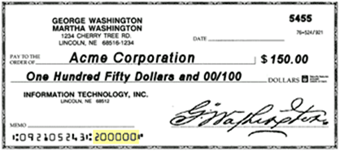
In 2 years    

United plans to open our application portal beginning Saturday, April 4 for small business and sole proprietorships. Starting April 10, independent contractors and self-employed individuals can apply. You can provide your information on this form, and we will email you a link when our portal is available to accept applications.

If a deposit is made before 5:45pm EST, the funds generally will be available the next business day. Deposits made after 5:45pm will not be proccessed until the following business day and made available the day after. (For example, if you deposit a check at 7:00pm EST on Monday, it will not be processed until Tuesday, with the funds available on Wednesday.) Business days include everyday except Saturday, Sunday and federal holidays.
All Interactive Tellers are located at a centralized location in Blairsville, Georgia.

Applications will be available online at ucbi.com/cares

American Banker has named United the best bank to work for seven years in a row. 

Take a look at our open positions across our 200 banking locations in Alabama, Georgia, Florida, North Carolina, South Carolina, and Tennessee.

There are over one million merchants that accept Apple Pay.  To see the full list, visit Apple’s website: https://www.apple.com/apple-pay/  or click here to learn more.
Consumers can use Google Pay at merchants accepting contactless payments as well as mag-stripe only terminals commonly deployed in-stores where a plastic card can be swiped. Look for the contactless payment symbol.     
Consumers can use Samsung Pay virtually anywhere you can swipe or tap your card.    

The Online Banking Login area is conveniently located in the top, right-hand corner of every page on ucbi.com when accessing it from your computer, laptop or larger screen tablets. Simply select "Online Banking", enter your Login ID and Password, then click Log In. View the Digital Demo here.

When accessing from a mobile phone or small tablet, tap the "LOGIN" to the right of the United Community Bank logo. It will expand so that you can select "Online Banking", enter your Login ID and Password, then click Log In.

TEXT Link: Call us toll-free at 1-800-UCBANK1 (1-800-822-2651)
Monday–Friday 8:00am–6:00pm EST
Saturday 9:00am–12:00pm EST and we will text you the link

Note: If you are a Personal Online Banking customer and have an Android or iPhone, you can use our Mobile Banking App! Simply download the United Community Bank Mobile App from your phone's app store.

Just enter your ZIP code or city and state in our locator to find branches near you.

The Federal Reserve Board and the New York Fed convened the Alternative Reference Rates Committee (“ARRC") to guide the industry's successful transition from LIBOR. In addition, the Federal Reserve has adopted regulations (the “Final Rule”) implementing the Adjustable Interest Rate (LIBOR) Act that was signed by President Biden on March 15, 2022 (the “Act”). 

Based on the Final Rule and the Act, commercial loans will transition from LIBOR to CME Term SOFR, plus certain spread adjustments specified by Congress. 

The Final Rule also sets out special rules for consumer loans, like adjustable rate mortgages and HELOCs. Consumer loans will transition from LIBOR to Refinitiv USD IBOR Consumer Cash Fallbacks (the “Consumer Replacement Index”), which is based on CME Term SOFR and is comparable to LIBOR. More information about the Consumer Replacement Index is available at Refinitiv’s website: refinitiv.com/usdiborconsumercashfallbacks.

Some loans may reference the ICE Swap Rate index (also sometimes referred to as the “swap rate,” “constant maturity swap rate,” or “ISDAFIX”). Because LIBOR is a component used to determine the swap rate index, that index will also no longer be available after June 30, 2023. Loans that reference the swap rate will transition to the USD SOFR Spread-Adjusted ICE Swap Rate index, which is calculated in accordance with the methodology suggested by ARRC.

United chose Clover as the POS system offering through our Merchant Services. We chose Clover over Square and PayPal because Clover:
  • Accepts the most payment types
  • Provides the most opportunities to customize and add apps
  • Offers the most robust customer service
  • Has the most flexible hardware options—beyond card readers and including countertop and handheld devices
Learn more about Clover.
 
Mobile Deposit is available to Online Banking customers with an active checking, savings or money market account in good standing. See terms and conditions for full details. You must be signed up for Online Banking and have our Mobile Banking App downloaded to use this service.    

Our Customer Support representatives are happy to assist you.

For Online & Mobile Banking Support:
Call us toll-free at 1-800-UCBANK1 (1-800-822-2651)
Monday–Friday 8:00am–6:00pm EST
Saturday 9:00am–12:00pm EST

For Treasury Management Banking Support:
Call us toll-free at 1-866-270-6100
Monday–Friday 8:30am–5:00pm
Or email us at [email protected]

For email inquiries:
In order for us to assist you, Always Include your bank location, the name on the account, your security answer and a preferred form of contact. If you would like a customer service representative to call you, please include your phone number and the best time to reach you. For your security, Never Include your identification numbers (social security numbers, etc.) or account numbers.

Stop by one of our locations near you to speak with a loan officer or use our locator tool to find a mortgage loan officer.

If you'd like to speak with one of our customer support representatives, please call us at 1-800-UCBANK1 (1-800-822-2651).

Anyone that has not owned a home in the last three years.    

Online/Mobile Banking: Error messages such as Invalid Secure Access Code and Information Missing or Invalid will often display if there is a data entry error. Please be aware, the Login ID and password fields are case sensitive. If you receive this message, make sure your caps lock and number lock keys are not on and that you are using the correct case. If you still receive an error message, please contact Customer Support and our team will be happy to assist you.

Statements: To read and/or print your eStatement, you must have Adobe® Acrobat® Reader installed. If you have Adobe Acrobat installed and still cannot view your statement, try to reinstall or update your Adobe Reader. If you still receive an error message, please contact customer support and our team will be happy to assist you.


For Online & Mobile Banking Support:
Call us toll-free at 1-800-UCBANK1 (1-800-822-2651)
Monday–Friday 8:00am–6:00pm EST
Saturday 9:00am–12:00pm EST

For Treasury Management Banking Support:
Call us toll-free at 1-866-270-6100
Monday–Friday 8:30am–5:00pm
Or email us at [email protected]

For email inquiries:
In order for us to assist you, always include your bank location, the name on the account, your security answer and a preferred form of contact. If you would like a customer service representative to call you, please include your phone number and the best time to reach you. For your security, never Include your identification numbers (social security numbers, etc.) or account numbers.

To read and/or print your eStatement, you must have Adobe® Acrobat® Reader installed. If you have Adobe Acrobat installed and still cannot view your statement, try to reinstall or update your Adobe Reader. If you still receive an error message, please contact customer support and our team will be happy to assist you.

For Online & Mobile Banking Support:
Call us toll-free at 1-800-UCBANK1 (1-800-822-2651)
Monday–Friday 8:00am–6:00pm EST
Saturday 9:00am–12:00pm EST

For Treasury Management Banking Support:
Call us toll-free at 1-866-270-6100
Monday–Friday 8:30am–5:00pm
Or email us at [email protected]

For Important note regarding email inquiries:
In order for us to assist you, Always Include your bank location, the name on the account, your security answer and a preferred form of contact. If you would like a customer service representative to call you, please include your phone number and the best time to reach you. For your security, Never Include your identification numbers (social security numbers, etc.) or account numbers.

Since opening our application portal, our team has been working around the clock to process over 6,500 applications. Even with a team of more than 500 working through this, we were only able to process so many loans until the SBA stopped accepting applications due to funds being exhausted. We will resume processing your application with the SBA if Congress allocates additional funds to the program.

Our fraud team has certain safety restrictions set with our debit cards to protect our customers. However, restrictions are not based on the amount of a purchase (unless you exceed your daily limit). Purchases could be restricted on the type of online vendors used which could be on a high fraud list.

We offer tools to manage your debit card preferences with Card Controls.
For a step-by-step guide to set up Card Controls, click here. If you need further assistance, please call our customer support representatives at 1-800-UCBANK1 (1-800-822-2651) between the following hours:
  • Monday–Friday, 8:00am–6:00pm ET
  • Saturday, 9:00am–12:00pm ET
No, you will not.     

No. We will use your existing application and begin processing PPP loans as soon as the SBA allows. We’re hopeful that more funding will be allocated. We’ll keep this page and our social media profiles updated with current information regarding these loans.

You may be prompted to call United Community Bank during normal business hours to verify your information and enable your card for Apple Pay™.    
For security purposes, you may be prompted to call United Community Bank during normal business hours.    
For security purposes, you may be prompted to call United Community Bank during normal business hours to verify your information and enable your card for Samsung Pay.    

The interest rate for all adjustable rate loans (also called “floating” or “variable” rate loans) are subject to increases or decreases over time regardless of the index used to calculate the rate. The actual impact on your interest rate or payment cannot be determined until your next regularly-scheduled change date. 

The transition from LIBOR will not affect your interest rate during any period when your loan contract provides for a fixed rate. Similarly, any maximum or minimum rates specified in your loan contract will not be affected. 

personal

Yes! To ensure your loan payments are made on time every month, you can set up recurring payments. This option is available for registered users and is not available as a guest.

Another easy way to set up automated payments is to open a United checking or savings account online and set up scheduled online transfers free of charge.

Make a Loan Payment

Yes, you can open a checking or savings account online and make payments via free online transfers.

You may also complete the online payment registration to pay as a registered user to avoid the fee.

Make a Loan Payment

Yes! But here’s a few things to remember:

  1. The loan can’t be a revolving line of credit as we do not process and payoff this loan type through the online loan payment system. Revolving lines of credit include Overdraft Protection, Home Equity Line of Credit, Personal Line of Credit or Business Line of Credit.
  2. The payment must be $5,000 or less and result in all outstanding principal, interest and applicable fees paid to $0.

Make a Loan Payment

No, you can only transfer between your checking, savings and loan accounts.    

Yes. Personal Online Banking customers can transfer funds from checking or savings accounts to make a loan payment as long as the accounts are viewable through Online Banking. Select Transfer/Deposit on the left menu, Select Funds Transfer and fill out the from and to account, then input the transfer amount and date. Click Transfer at the bottom after you have reviewed the transfer details.

Important: Payments made before 6:00pm each business day will be applied the same day.

You don’t need one, but if you’ve never bought a home, it can be very helpful to have a licensed professional guiding you every step of the way. The agent will handle writing up the offer, negotiating the terms of the contract, scheduling inspections (using vendors you choose), and communicating with the listing agent and settlement agent.
Start a conversation with one of our mortgage experts—we can discuss your financial and homebuying goals and your current financial situation and then help you get started on the secure, digital application.
In order to find out why a loan payment made from a debit card of another financial institution was declined, you will need to contact the financial institution who issued the card.    
You may visit your local branch or call the Contact Center at 1-800-UCBANK1 (1-800-822-2651) to update your address. 
Payments made before 5:00pm Monday – Friday (excluding bank holidays) will post the same day and be applied to your loan balance. Payments made after 5:00pm, on bank holidays, or on weekends will post and be applied to your balance the next available business day.
Make a Loan Payment

The payment will appear on the statement with the description, “United Loan Payment.”

You need to let us know as soon as possible by fax or mail at the address below that you’ve changed insurance companies. Please include your name, address, and loan number, along with the new policy information.

Mail:
United Community Bank
ISAOA/ATIMA
P O Box 7092
Troy, MI 48007-7092

Fax: 1-248-710-1630

You may also submit your insurance policy online at expressinsuranceinfo.com/3076927

Please ensure that the mortgage clause on the new policy matches the name and address above.

There is no fee for making a loan payment online if you register by setting up a user ID and password and sign in to make your payment using your checking or savings account information.

Make a Loan Payment

The username must be at least 5 characters. You may use uppercase and lowercase letters and numbers. The following special characters are allowed (_ . @ ‘ # $ -). Special characters cannot be the first or last character of the username.

The password must be at least 8 characters and should contain at least three of the four following character types: uppercase letters, lowercase letters, numbers, and special characters.

  • Check number (required field)
  • Payee of the check (required field)
    If the check was lost or stolen, enter Lost/Stolen for the Payee
  • Amount of the check ($0.00 can be entered if the amount is not known)
    Dollar ranges cannot be entered
  • Date of the check (current date can be entered if the exact date is not known
    Date ranges cannot be entered

From the login screen, click “Forgot Username” or “Forgot Password”. The system will provide the challenge questions and allow you to obtain your username and reset your password.

If you are unsuccessful in resetting your password or need additional help with your username, please contact customer service at 1-800-UCBANK1 (1-800-822-2651) Monday–Friday 8:00am–6:00pm EST and Saturday 9:00am–12:00pm EST

Password: Follow this walk-through demo to learn how to reset your online banking password. View the Digital Demo.

Account Locked: If you’ve been locked out of your online banking account, select “Forgot Login/Unlock” on the login screen and fill out the requested information. For the step-by-step process, you can also watch our digital demos on account recovery.

Note: For your protection, your account will be locked out after 3 invalid password attempts. You will need to contact Customer Support to reset your password if your account has been locked. To contact Customer Support, please call 1-800-UCBANK1 (1-800-822-2651).

The following forms of payment are accepted through the online loan payment system:

  • Debit card
  • ACH - bank account and routing number

Make a Loan Payment

The maximum payment allowed per transaction is $5,000.

Please call our Insurance Department at 1-888-801-6590 for questions about an insurance notice or if you change insurance providers.    
795-15    
Most of the costs of a loan are paid at closing, not during the process. You can expect to pay lender charges, title insurance charges, and attorney settlement charges. Most of your closing costs will go toward escrow accounts—they’re set up to pay for taxes and insurance and can be thousands of dollars.

An escrow account acts as a savings account and is managed by your loan servicer. A portion of your monthly payment is deposited into the account to cover your estimated taxes and insurance premium when they are called due.
 

Most standard loan types are eligible for making payments through the online loan payment system.

Make a Loan Payment

Stop by one of our locations near you to speak with a loan officer or use our locator tool to find a mortgage loan officer.

If you'd like to speak with one of our customer support representatives, please call us at 1-800-UCBANK1 (1-800-822-2651) and choose Option 6.

External Link Disclaimer

You are leaving United Community and being directed to a third-party site that is not maintained, owned or operated by United Community Bank. United Community does not control and is not responsible for the privacy or security practices of the third-party. By clicking “Accept,” you are requesting to be transferred to the third-party website. If you do not want to visit the page, you can close this page by clicking "Return To Site”.